
Payments
Payment Selection Helper
Use open balance line selection to target selected charges, prefill payment amounts, and preserve the payment intent for audit history.
Overview
The Add Payment modal can show open balance line items from the Rental Ledger. Each unpaid charge line can be selected as a helper when recording a payment.
The helper is designed to speed up entry, make the payment note clearer, and preserve which open charges the user selected. The ledger honors those selected charge targets before falling back to the standard allocation rules for any remaining amount.
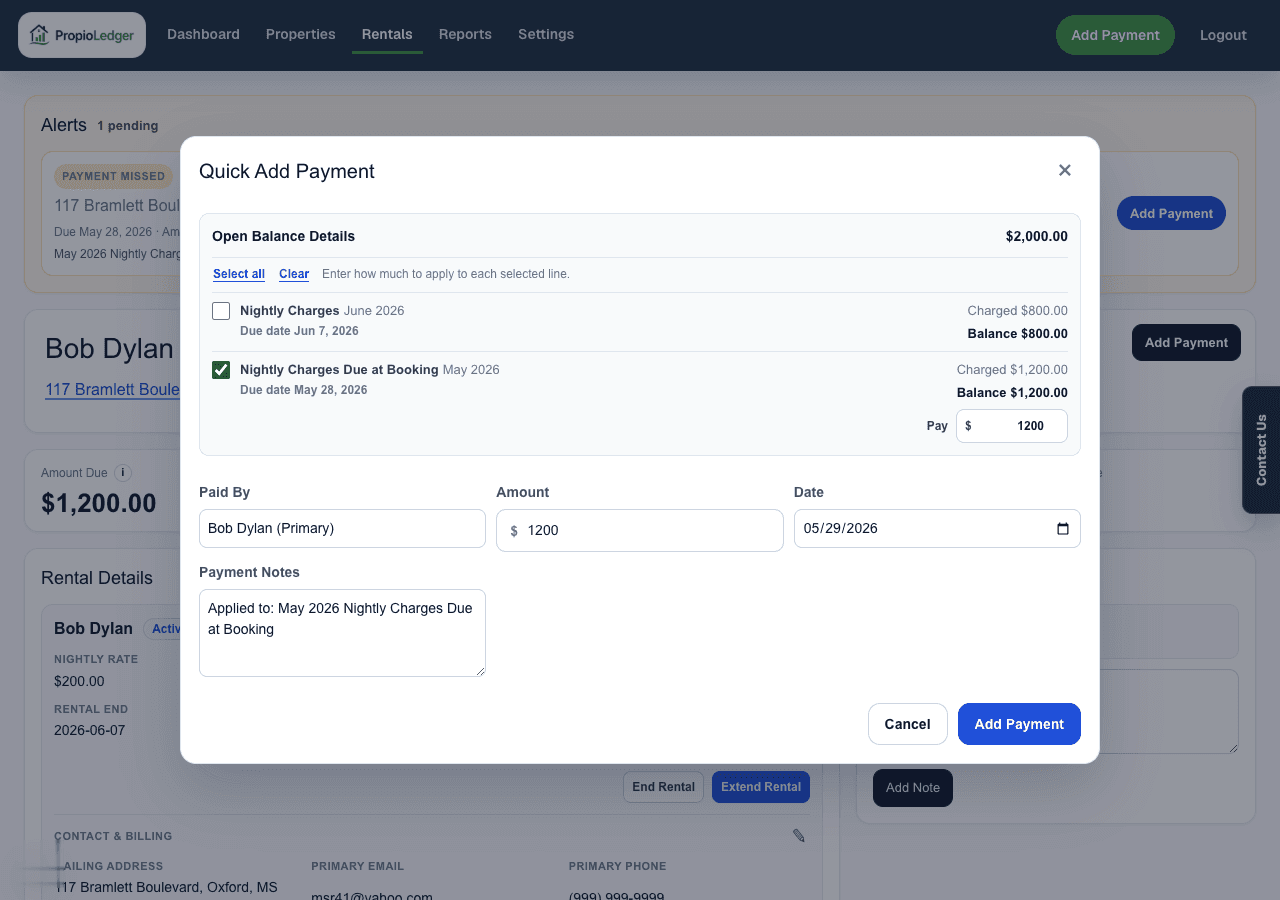
What Selection Does
- Selecting one or more line items fills the payment amount with the selected remaining balance total.
- Selecting all open balance lines fills the amount with the full open balance.
- Open balance lines are sorted with overdue and oldest-due charges first.
- Opening Add Payment preselects unpaid line items whose due dates are today or earlier.
- When selected lines all map to one payment type, the modal updates the payment type to that type.
- When selected lines include mixed types, the modal uses Rent as a broad balance-applying payment type.
- The modal writes a note such as Applied to: April 2026 Rent, April 2026 Late Fee.
- The saved payment stores the selected charge targets so the ledger can apply the payment to those selected lines first.
What Happens After Saving
The saved payment remains one posted payment record in the Payment Ledger. The selected line details travel with that payment as payment intent, including charge, month, label, due date, amount, and payment type.
The Rental Ledger uses that saved selection first, then applies any remaining payment amount through the normal allocation rules. This keeps the helper aligned with the authoritative ledger calculation while preserving why the payment was entered that way.
When To Use It
Use the helper when a renter is paying one or more visible open charges and you want the payment amount and notes to reflect those selected items.
If the payment does not map cleanly to visible open charges, enter the amount, type, and notes manually.
Related Guides
Last Updated
August 2026