
Expenses
Expense Reporting
Understand how property expenses flow into property financials, cashflow, dashboard metrics, Cashflow Reports, and Accounting Reports.
Overview
Expenses are property-level costs. They appear in property financials and accounting reports, and they reduce net cashflow. Most expense categories also reduce net operating income, but Mortgage Principal is treated as a non-operating principal reduction for NOI-style calculations.
Expenses are not treated as rental charges, so they do not reduce or increase an individual renter balance.
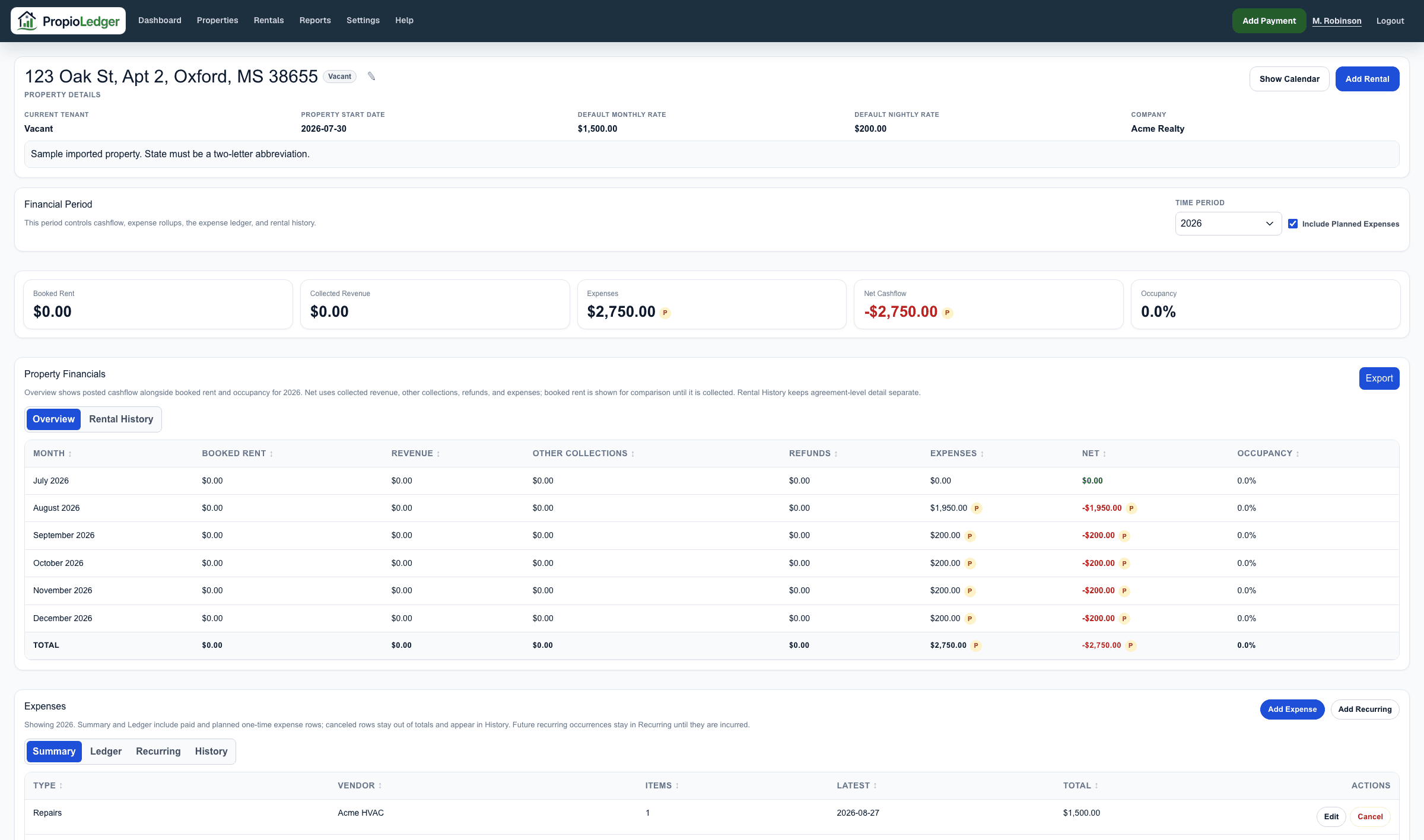
Property Page Views
The property page Expenses section has four tabs. Summary rolls up included paid and planned expenses by type and vendor. Ledger shows included expense rows for the selected period. Recurring shows active and stopped recurring expense series, including the next scheduled occurrence. History shows canceled expenses for the selected period.
Property Financials combine posted cashflow with booked rent and occupancy. Expense totals appear in the Expenses column for each month, and planned expense activity is flagged with a P marker.
Planned And Canceled Expenses
Planned expenses are future or expected costs. They are marked with a P indicator in property metrics, dashboard metrics, and supported report tables so users know planned costs exist.
When an Include Planned Expenses checkbox is available, turning it on includes planned expenses in the displayed totals. Turning it off keeps totals focused on paid activity while still showing P markers for awareness.
Canceled expenses are excluded from totals, cashflow, dashboard metrics, and reports. They remain visible in the property expense History tab unless deleted.
Property Cashflow
In property cashflow, Expenses are the sum of paid property expense rows plus planned expenses when planned expenses are included. Net is revenue plus other collections, minus refunds and expenses.
Refunds are shown separately as payment cash outflows and are not reported as property expenses.
Dashboard Metrics
Dashboard Expenses are the sum of included property expenses in the selected dashboard period. Dashboard Net is collected revenue minus expenses.
Dashboard metric cards and property rows can show a P marker when planned expense activity exists in the selected period.
Expenses help explain company-level performance, but detailed expense review belongs on the property page and reports.
Cashflow And Accounting Reports
The Cashflow Report focuses on property-level money in and out. Expenses are property expense amounts in the selected period, and Net is revenue minus expenses. Supported reports can include planned expenses when the Include Planned Expenses checkbox is turned on.
The Accounting Report keeps expense categories, property totals, and expense detail visible. Mortgage Principal appears in expense detail and categories, but it is excluded from Net Operating Income calculations so principal reduction is not treated like an operating expense. Canceled expenses are excluded from report totals.
Formula
Property expense total = sum of paid property expense rows in the selected period, plus planned expense rows when planned expenses are included.
Property cashflow net = revenue + other collections - refunds - expenses.
Accounting net operating income = rental income + other collections - property expenses.
Last Updated
August 2026