
Reports
Accounting Report
Use accountant-ready detail for rental income, other collections, property expenses, refunds, and net operating income.
Overview
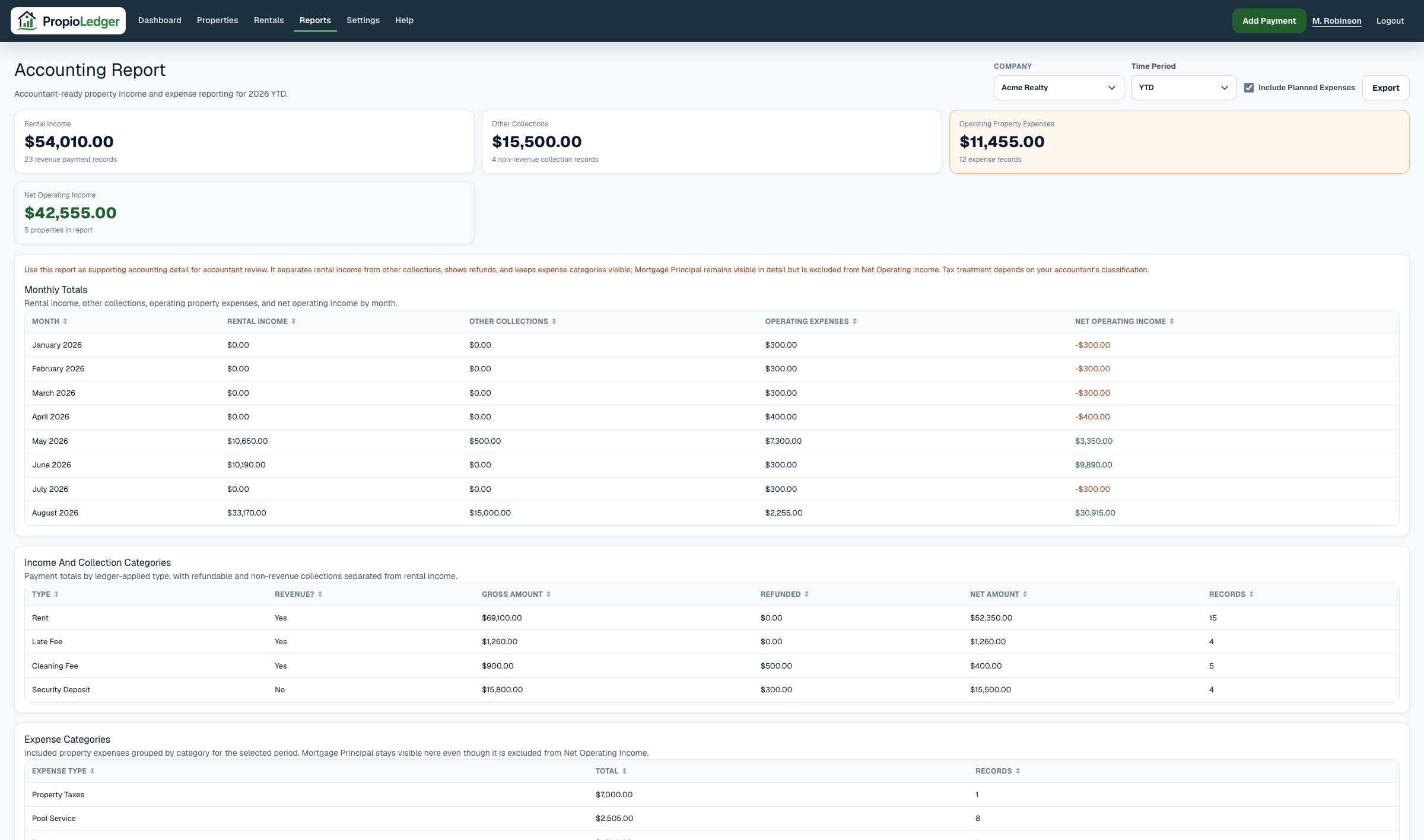
The Accounting Report provides accountant-ready financial detail for rental property owners. It organizes rental income, other collections, property expenses, refunds, and net operating income for a selected period.
Use this report when you need supporting accounting detail for bookkeeping review, year-end organization, accountant conversations, or tax preparation. It is supporting accounting detail, not tax advice.
When To Use It
The Accounting Report is useful when you need classification and detail rather than only performance totals. It separates revenue from non-revenue collections and keeps refunds visible.
It answers questions such as how much rental income was collected, how much came from deposits or reimbursements, what property expenses were posted, and which records support those totals.
Available Date Ranges
- Year To Date.
- Current calendar year.
- Prior calendar years with payment or expense data.
Summary Metrics
Rental Income is revenue generated from rental operations. Revenue categories include Rent, Late Fee, Last Month Rent, Application Fee, and Cleaning Fee.
Other Collections are collections that are not counted as rental income in this report, such as Security Deposit, Pet Deposit, Repair Reimbursement, Utility Reimbursement, and Other.
Property Expenses are paid property expense rows whose date falls inside the selected period, plus planned expenses when Include Planned Expenses is turned on. Mortgage Principal remains visible in expense categories and detail, but is excluded from Net Operating Income.
Net Operating Income is Rental Income minus operating property expenses. Other Collections are shown separately and are not included in Net Operating Income.
Payment Count, Expense Count, and Property Count show how many records and properties are represented in the selected period.
Monthly Totals
The Monthly Totals section groups rental income, other collections, property expenses, and net operating income by month.
Use this section to spot seasonal changes, refund impacts, expense timing, and months that may need additional review before sharing records with an accountant.
Income And Collection Categories
The Income And Collection Categories section groups payments by ledger-applied category when available, with a fallback to the posted payment type when there is no ledger allocation.
Each category row shows whether it is treated as revenue, gross amount collected, refunded amount, net amount, and record count.
Expense Categories
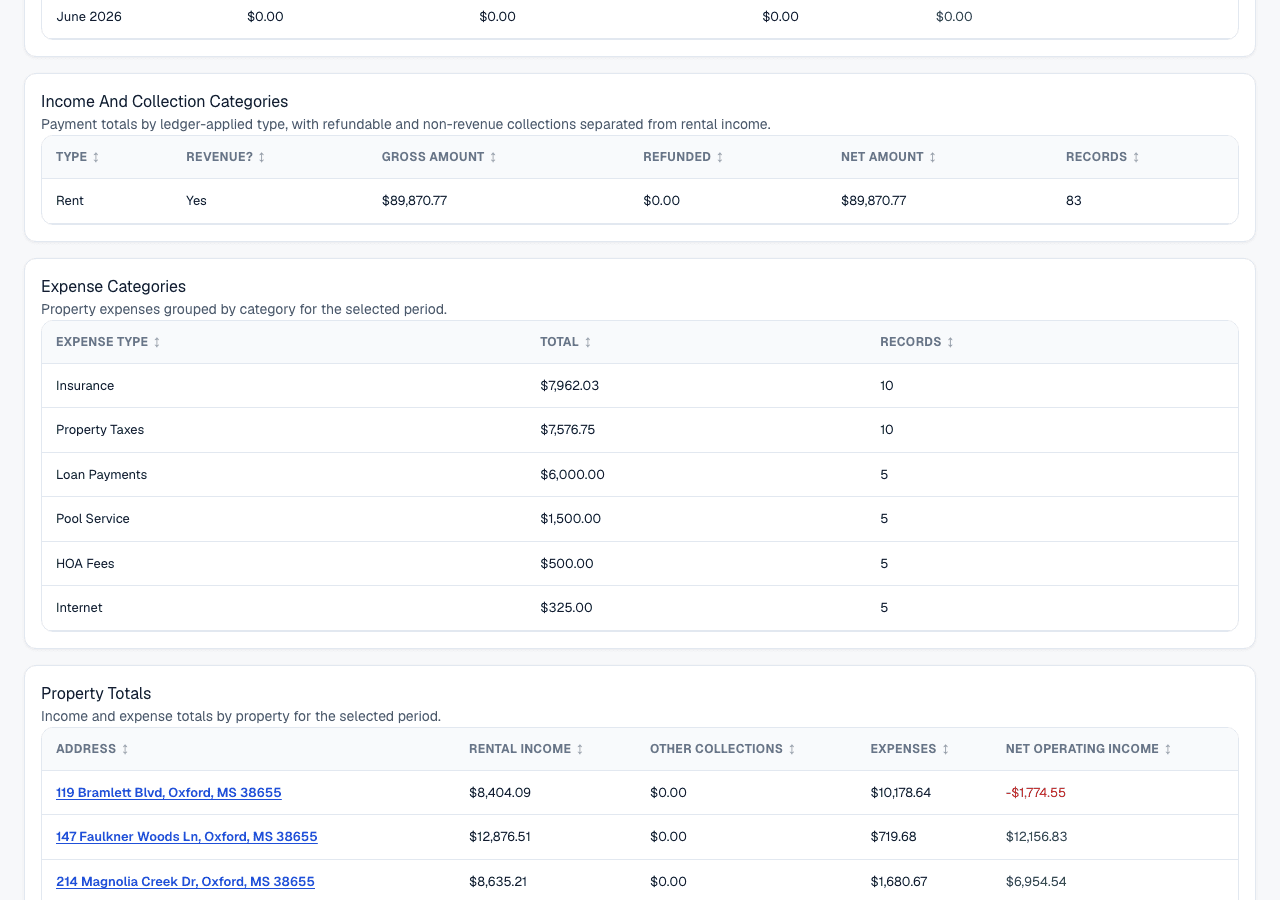
The Expense Categories section groups included property expenses by normalized expense type. Examples include Property Tax, Insurance, Maintenance, Repairs, Utilities, HOA Fees, Landscaping, Cleaning, and Professional Services.
Use this section to understand where money was spent and to prepare clean category totals for accounting review.
Property Totals
The Property Totals section summarizes rental income, other collections, operating expenses, and net operating income by property.
Use this section to compare properties and to trace accounting totals back to the rental portfolio.
Payment Detail
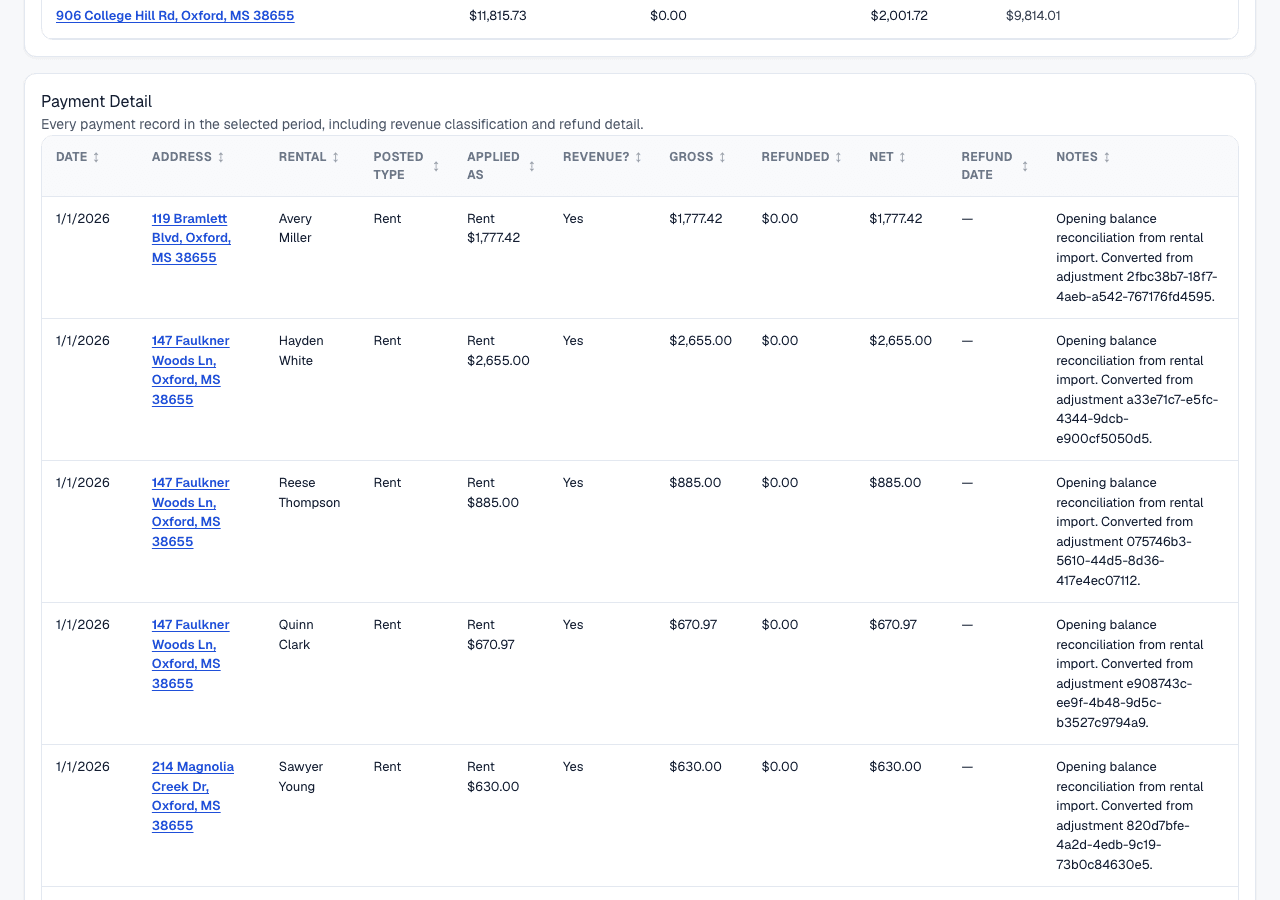
The Payment Detail section shows payment-level records in the selected period. It includes date, property, rental, posted type, applied category, revenue classification, gross amount, refunded amount, net amount, refund date, and notes.
Use this section when researching a specific payment, refund, deposit, reimbursement, or category classification.
Expense Detail
The Expense Detail section lists included property expense records in the selected period. It includes date, status context, property, type, paid by, vendor, amount, and notes.
Use this section to review source expense rows before accountant review or year-end cleanup.
Formula
Rental Income uses ledger-applied revenue categories when available, falling back to the posted payment type when there is no ledger allocation.
Other Collections use ledger-applied non-revenue categories when available, falling back to the posted payment type when there is no ledger allocation.
Gross Amount is the posted payment amount before refunds.
Refunded Amount is the recorded refund amount capped at the gross payment amount.
Net Amount = gross amount - refunded amount, never below zero.
Operating Property Expenses = included property expense rows whose date falls inside the selected period, excluding Mortgage Principal.
Net Operating Income = Rental Income - Operating Property Expenses.
Data Sources
Payment categories use rental ledger allocation when available. This lets a payment be classified by the charge it was applied to, such as Rent, Late Fee, Security Deposit, or Pet Deposit.
When a payment has no ledger allocation, PropioLedger falls back to the posted payment type.
Expense categories come from paid property expense rows, plus planned rows when planned expenses are included. The Accounting Report does not include future scheduled recurring expense occurrences until they become property expense rows.
Included Records
- Payment transactions dated inside the selected period.
- Ledger-applied payment categories when payment allocation exists.
- Gross payment amounts, refunded amounts, and net amounts.
- Paid property expenses with a date inside the selected period.
- Planned property expenses with a date inside the selected period when Include Planned Expenses is turned on.
- Properties represented by payment or expense activity in the selected period.
Excluded Records
- Unpaid rental ledger charges that have not been collected as payments.
- Planned expenses when Include Planned Expenses is turned off.
- Canceled expenses.
- Future scheduled recurring expense occurrences that have not become property expense rows.
- Property expenses whose date falls outside the selected period.
- Payments or expenses outside the current company scope.
- Other Collections from Net Operating Income, because they are shown separately from rental income.
Rental Income Vs Other Collections
Rental Income includes revenue categories such as Rent, Late Fee, Last Month Rent, Application Fee, and Cleaning Fee.
Other Collections include Security Deposit, Pet Deposit, Repair Reimbursement, Utility Reimbursement, and Other. These are separated so the landlord and accountant can classify treatment appropriately.
Security deposits, pet deposits, and reimbursements are not included in Rental Income in this report.
Refunds And Net Amounts
Refunds reduce the amount counted in the report. The report shows Gross Amount, Refunded Amount, and Net Amount so users can see both the original collection and the amount remaining after refunds.
Net Amount is never below zero because refunded amount is capped at the gross payment amount.
Common Use Cases
- Review year-to-date rental income and property expenses before meeting with an accountant.
- Separate deposits and reimbursements from rental revenue.
- Research payment refunds and net collection amounts.
- Review expense categories before year-end cleanup.
- Compare property-level net operating income.
Things To Watch For
- The Accounting Report supports accounting review but does not provide tax advice.
- Payment classification depends on ledger allocation when available, and falls back to posted payment type when there is no allocation.
- Deposits and reimbursements are shown separately from rental income so an accountant can determine treatment.
- Expenses appear when their date is inside the selected period.
- P markers identify planned expense activity where supported.
- Scheduled recurring expenses are not included until they become property expense rows.
Export Options
The Accounting Report supports CSV download, Excel download, and printable PDF-style browser export.
Related Guides
Common Questions
- What is the purpose of the Accounting Report?It organizes financial activity into accounting-friendly categories for review.
- Why are deposits separated from rental income?Deposits often need separate accounting treatment, so the report keeps them outside Rental Income.
- What is Net Operating Income?Net Operating Income is Rental Income minus operating property expenses. Mortgage Principal stays visible in detail but is excluded from this calculation.
- Why does the report show refunds?Refunds reduce actual collections and should remain visible in financial reporting.
- Can I use this report for tax preparation?It can support tax preparation and accountant review, but it does not provide tax advice.
Last Updated
August 2026