
Rentals
Rental Ledger Overview
Understand charges, payments, refunds, waivers, open balance, and past due amount for a rental.
Overview
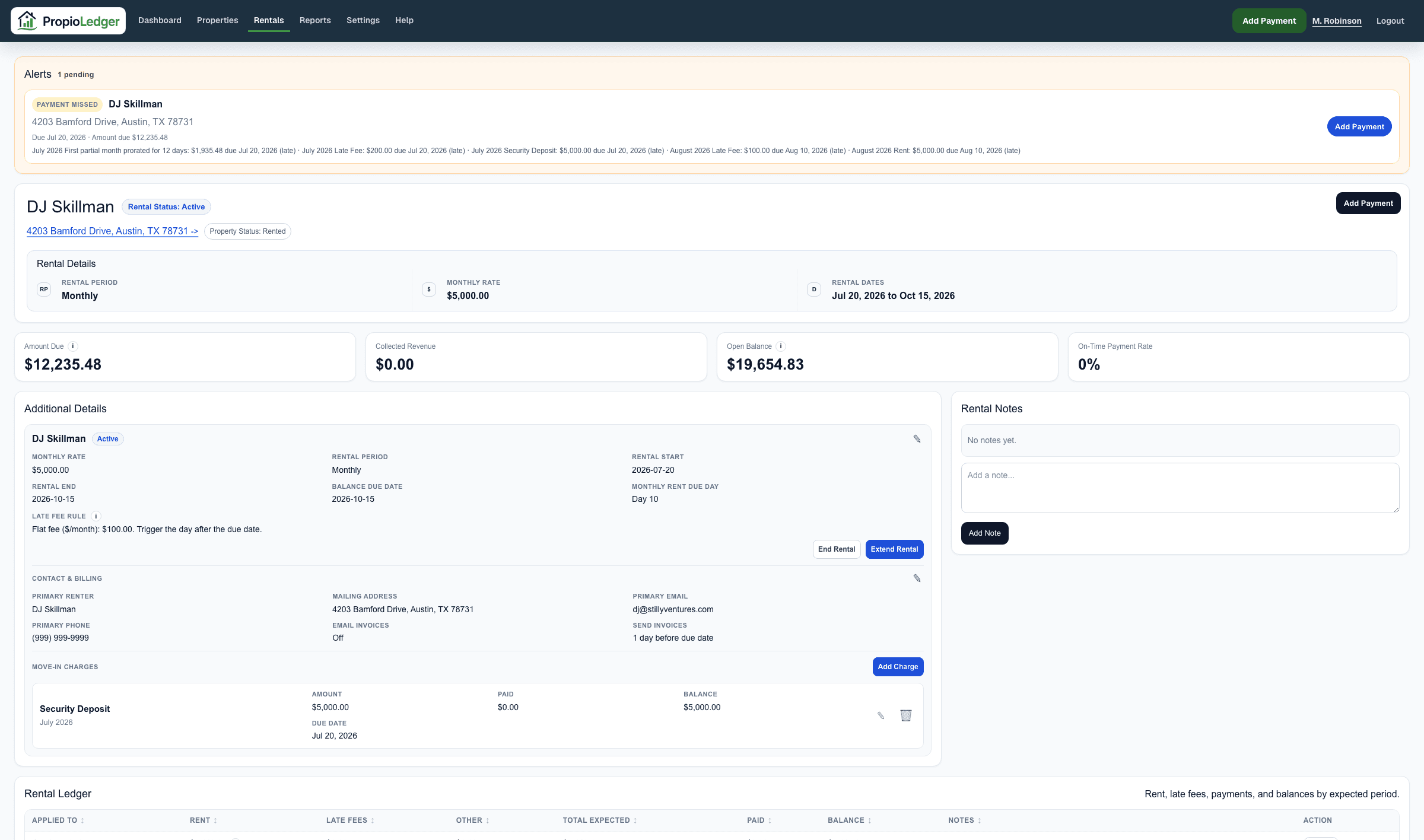
The Rental Ledger is the source of truth for what a renter owes. It combines rental charges, payment allocations, refunds, waivers, late fees, and due dates into one balance view.
Use the ledger when you need to explain a rental balance, understand why a payment missed alert appears, compare open balance to past due amount, or verify how a payment affected the rental.
- Review the summary totals: Total Charged, Total Paid, Open Balance, and Past Due Amount.
- Check the charge rows and due dates.
- Compare payment allocations, credits, and refunds.
- Review waivers or charge adjustments.
- Use the Payment Ledger when you need the raw payment transaction history.
Charges And Payments
Charges are amounts owed by the renter, such as monthly rent, nightly charges, security deposits, pet deposits, cleaning charges, late fees, move-in charges, booking charges, and other charges.
Posted rent and assessed late fees keep the rule details that created them, such as rent due day, due date used, rate, late fee rule, grace period, and amount assessed. Audit tooltips on ledger amounts can show those details when they are available.
Changing rental settings later applies to future or unposted charges by default. Posted charge corrections should appear as separate ledger actions, such as a due-date change, waiver, waiver undo, refund, or payment void.
Payments reduce balances through the app allocation rules. Users can select open balance line items in Add Payment; those selected charge targets are stored with the payment and honored by the ledger before fallback allocation rules apply.
Refunds reduce the net collected amount without deleting the original payment record. A full refund removes that payment from revenue and balance allocation; a partial refund keeps only the unrefunded portion active.
Open Balance
Open Balance is the unpaid rental ledger balance for visible charges. It can include charges due now, past due charges, and future charges that are not due yet.
A useful way to read it is: Open Balance equals the sum of each visible charge remaining amount. For each charge, remaining amount is the charge amount after waivers minus the amount paid toward that charge, never below zero.
Because future booked charges can be visible before they are due, Open Balance can be larger than Past Due Amount.
Past Due Amount
Past Due Amount is due-date aware. It includes only unpaid charges whose due date is today or earlier.
Use Past Due Amount as the collection follow-up number. Future charges may remain in Open Balance, but they are not past due until their due date arrives.
Waivers And Adjustments
Waivers reduce what is owed. They are not payments and they do not represent cash collected.
Use waivers for unpaid rent, late fees, move-in charges, or one-time charges when the renter no longer owes that amount. Use refunds when money was collected and later returned.
Waived amounts appear with the affected charge so the ledger can explain the original charge, paid amount, waived amount, and remaining amount.
Undoing a waiver creates a separate reversal entry instead of editing the original waiver. Due-date corrections are also layered on top of posted charges so an owner can tell whether a balance changed because of a payment, waiver, reversal, or due-date change.
Rental Audit History
Rental detail pages include a Rental Audit History section near the bottom of the page. It is scoped to the rental, not the global app-admin activity log.
Use it to review setting changes, waivers, waiver reversals, due-date changes, and payment voids. Entries show the user, timing, reason or summary, linked event when available, and owner-facing balance impact context.
Rental Ledger Vs Payment Ledger
The Rental Ledger explains what is owed. It shows charges, payment allocations, refunds, waivers, due dates, open balance, and past due amount.
The Payment Ledger explains what was posted. It shows payment transactions, payment dates, payment types, notes, refund details, allocation context, and voided payment history.
For clerical payment corrections, void the incorrect payment and add a corrected payment. A voided payment remains visible for audit history but no longer reduces balances or reports.
Use the Rental Ledger for balance questions. Use the Payment Ledger when you need to audit payment history.
Common Questions
- Why is Open Balance larger than Past Due Amount?Open Balance can include future charges that are not due yet. Past Due Amount includes only unpaid charges due today or earlier.
- Why does a refund not delete the payment?Refunds preserve the original payment record for audit history, then reduce the net collected amount used in ledger and revenue calculations.
- Why does a waiver not show as a payment?A waiver reduces what is owed. It is not cash collected.
- Why can I still see a voided payment?Voids preserve the original posted payment for audit history while removing its balance and reporting impact.
- Why does a security deposit affect balance but not rental revenue?Deposits can be owed and paid, but security deposits and pet deposits are not counted as rental revenue in revenue reports.
- Can I manually assign a payment to one ledger row?Add Payment can select open balance lines and save those selected charge targets with the payment. The ledger honors those targets before using fallback allocation rules.
- Where should I start if a balance looks wrong?Review charges, due dates, payments, refunds, waivers, and any opening balance used during import.
Last Updated
August 2026