
Rentals
Rental Types And Availability
Compare monthly and nightly rentals, understand availability checks, and see how date conflicts affect bookings and occupancy.
Overview
PropioLedger supports monthly and nightly rentals. Both rental types connect a property, renters, dates, charges, payments, balances, invoice settings, occupancy, and reporting, but they differ in how rent is calculated and billed.
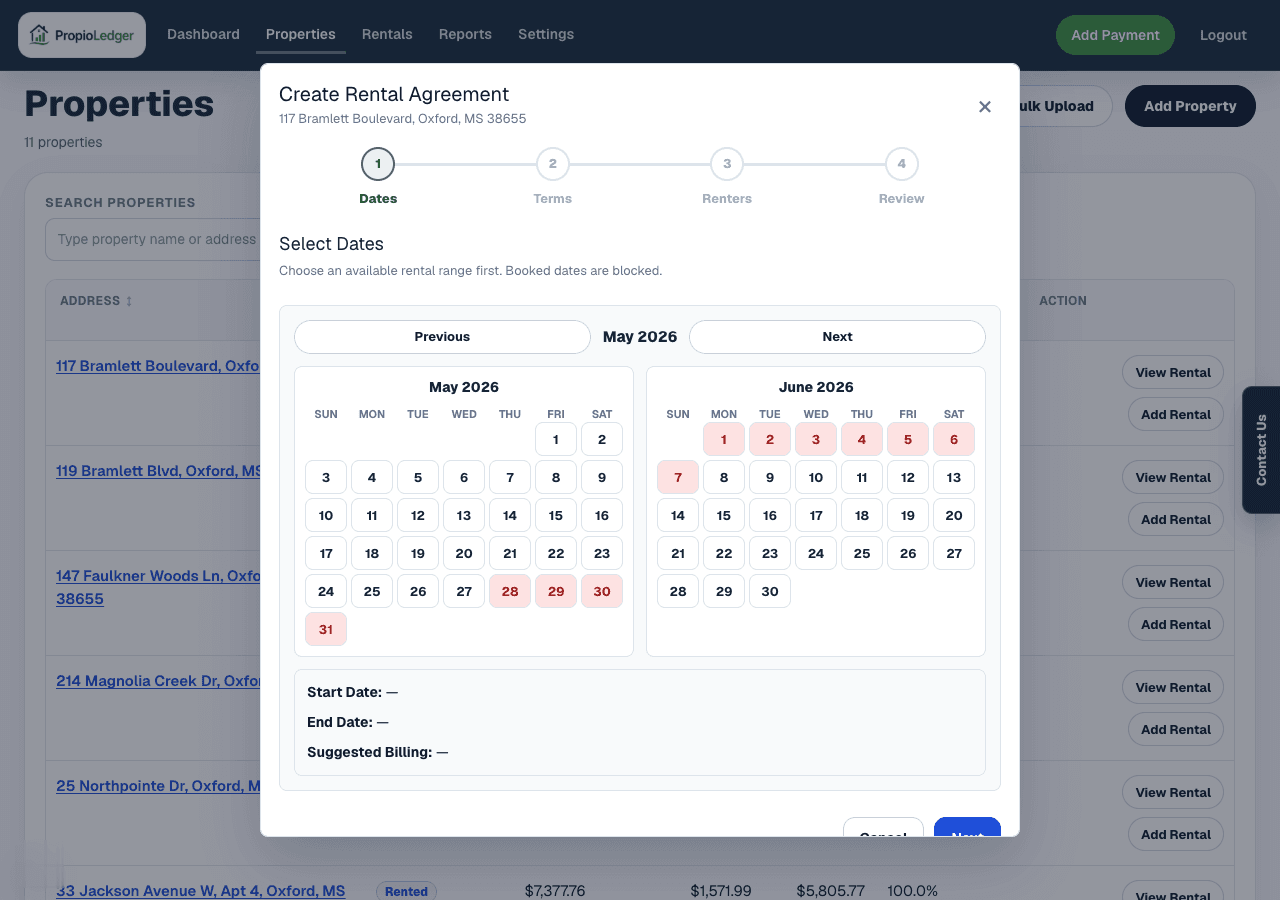
Availability is based on rental dates, not the property status label. When you create or change a rental, PropioLedger checks the selected date range against existing rentals for the same property before allowing the change.
Monthly Rentals
Monthly rentals are designed for traditional lease-based agreements, such as long-term tenants, annual leases, and month-to-month rentals.
Monthly rent charges are generated throughout the rental period based on the rental rate, rental dates, rent due day, and proration settings when a rental starts or ends mid-month.
- Monthly rent amount
- Rent due day
- Start date and end date
- Late fee settings
- Invoice settings
- Deposits and move-in charges
Nightly Rentals
Nightly rentals are designed for short-term stays, such as vacation rentals, weekend bookings, and seasonal stays.
Nightly rent is calculated as Nightly Rate x Number of Nights. For example, a $200 nightly rate for a 3-night stay creates $600 of booked rent.
- Nightly rate
- Booking charges
- Deposits
- Cleaning charges
- Payment due date
- Invoice settings
Property Availability
A property is unavailable whenever an existing non-canceled rental occupies the requested date range. Booked and Active rentals reserve dates so another rental cannot be created over the same period.
Future rentals reserve their dates as soon as they are created. They display as Booked until the start date arrives, but those dates are already unavailable for other renters.
Canceled future rentals release their dates. After cancellation, the dates can be booked by another rental and the canceled rental no longer participates in normal occupancy calculations.
Conflict Rule
A conflict occurs when a rental overlaps another rental for the same property.
The practical rule is: a new rental conflicts when its start date is on or before an existing rental end date and its end date is on or after an existing rental start date. Open-ended rentals are treated as continuing forward.
Conflict Example
Existing rental: June 1 through June 30. New rental: June 15 through July 15. Result: conflict detected. The new rental cannot be created until the overlap is resolved.
Existing rental: June 1 through June 30. New rental: July 1 through July 31. Result: no conflict. The new rental can be created.
Ended Rentals
Ended rentals remain available for reporting and historical reference. They keep their historical date range so the property history is accurate.
An ended rental does not block future dates outside its historical rental period, but its historical period still exists and cannot be overwritten by another rental for the same property.
Availability Versus Occupancy
Availability answers: can this property be booked during this period? It is based on rental date conflicts.
Occupancy answers: was this property occupied during this period? It is used in dashboard metrics, reports, and property performance views.
Common Questions
- Can I have multiple rentals for the same property?Yes. A property can have many rentals over time, but rental dates cannot overlap.
- Do future bookings block availability?Yes. Future rentals reserve their dates as soon as they are created.
- Does cancelling a rental free up those dates?Yes. Cancelled rentals no longer reserve dates and no longer participate in normal availability calculations.
- Can I create overlapping rentals?No. PropioLedger prevents overlapping rental date ranges for the same property.
- Why does a future rental show Booked instead of Active?A rental remains Booked until its start date arrives. On the start date, it is treated as Active.
Related Guides
Last Updated
May 2026