
Rentals
Rental Lifecycle Actions
End, extend, cancel, or delete rentals while preserving availability, balances, refund history, reporting, and audit context.
Overview
Rental lifecycle actions change the status or date range of an existing rental. These actions are separate from payment entry because they affect occupancy, availability, alerts, financial reporting, and history.
Refund amounts are handled inside lifecycle workflows. There is no general standalone Refund button on the Payment Ledger. Use End Rental when a started rental is over, and use Cancel Rental when a future booked rental will not happen.
Understanding Rental Statuses
Available lifecycle actions depend on the current rental status.
- Booked: a future rental that has not started yet.
- Active: a rental currently in progress.
- Ended: a rental that has completed or has been manually ended.
- Cancelled: a future booking that was cancelled before it started.
End Rental
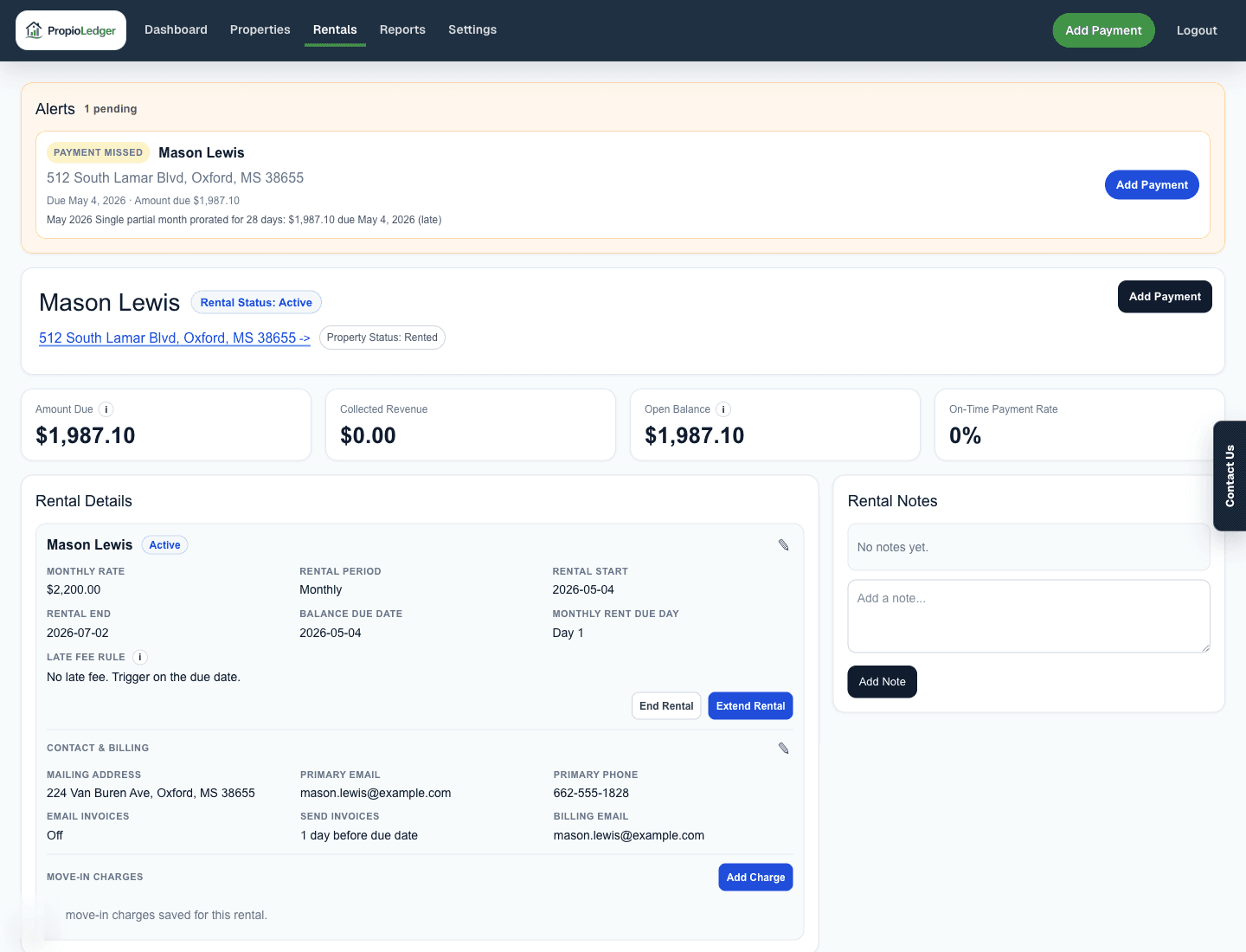
Use End Rental for an Active rental that has already started. This is the right action when a renter moves out early or a rental needs to be closed before its originally scheduled end date.
End Rental is not available for Booked, Ended, or Cancelled rentals.
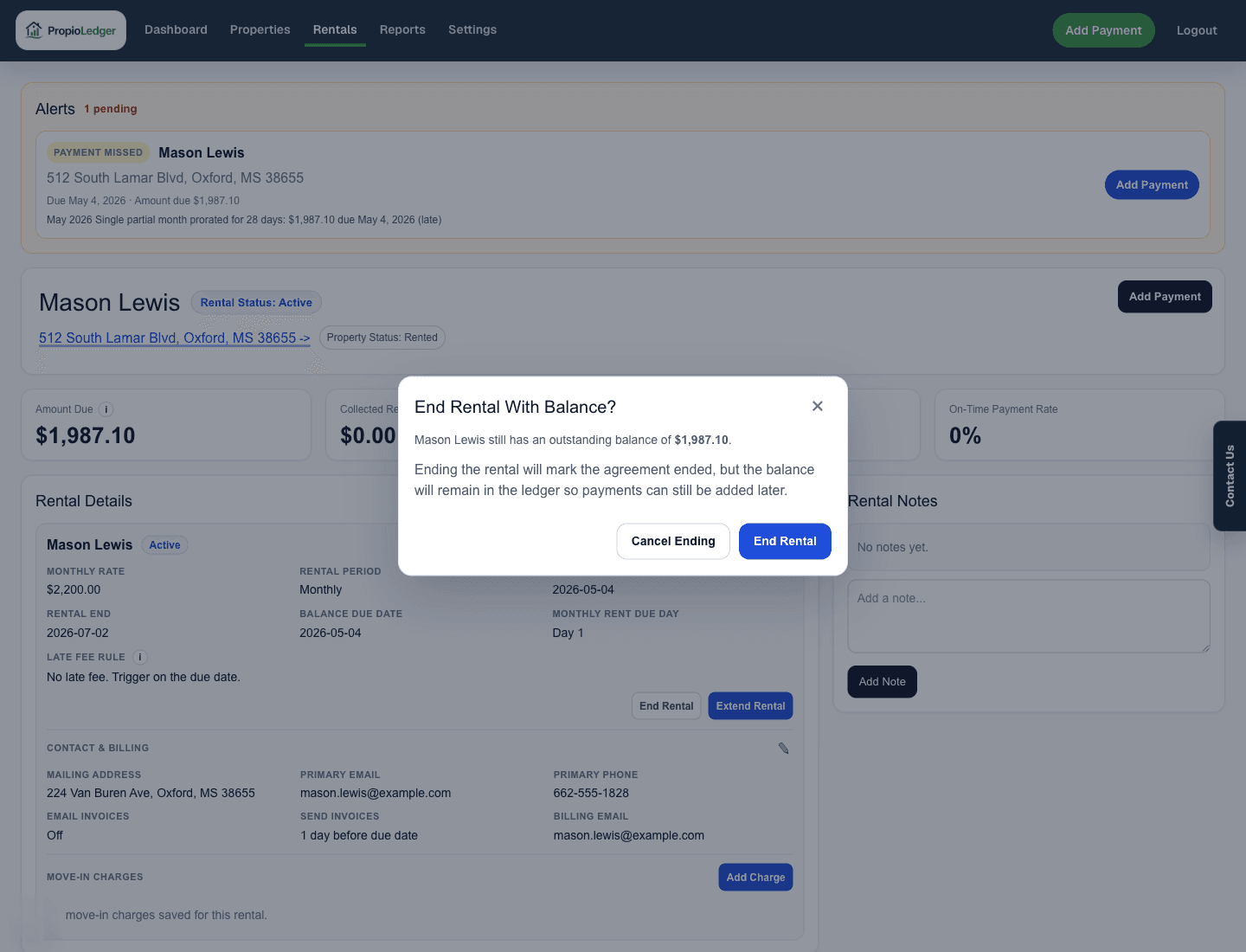
Ending the rental closes the occupancy period, but it keeps the rental history, ledger charges, payments, refunds, waivers, and remaining balances available.
If the rental has refundable deposit payments, the End Rental modal can show Deposit Refunds. Refund amounts default to the unrefunded deposit balance, and the user can reduce an amount to retain part of a deposit.
- Open the started active rental.
- Choose End Rental.
- Review any outstanding balance warning.
- If Deposit Refunds appear, confirm or adjust each Refund amount.
- Add Refund / retention notes when needed.
- Choose End Rental.
What Ending Changes
- Rental status changes to Ended.
- Occupancy calculations are updated.
- Current tenant information is updated.
- Future invoice emails stop.
- Rental history remains intact.
- Payment history remains intact.
- Outstanding balances remain intact.
Close Reasons
When ending a rental, the close reason should explain why the rental is being closed.
- Lease Ended
- Evicted
- Foreclosed
- Other
Cancel Rental
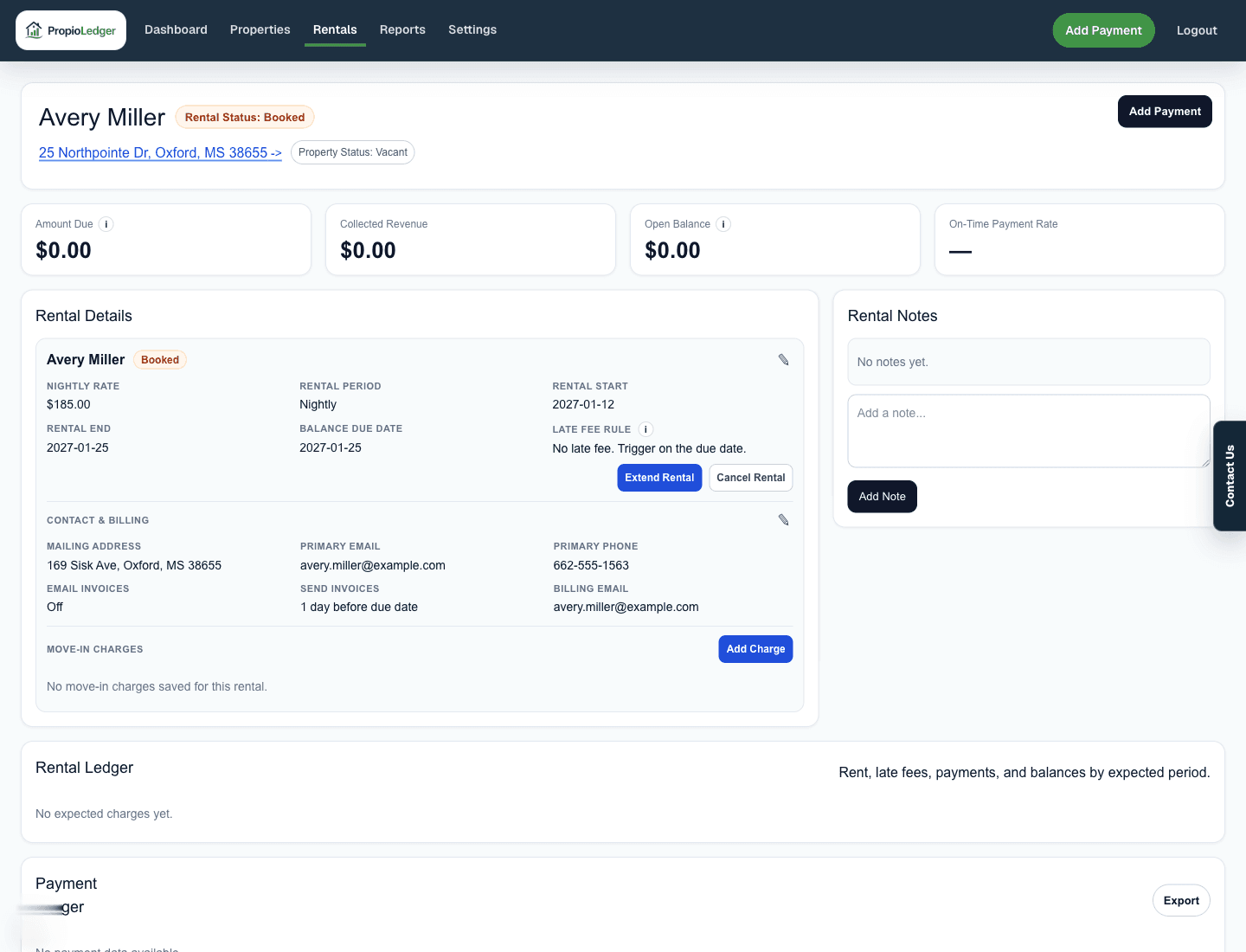
Use Cancel Rental for a future Booked rental before the rental start date. Started rentals cannot be canceled; they should be ended instead.
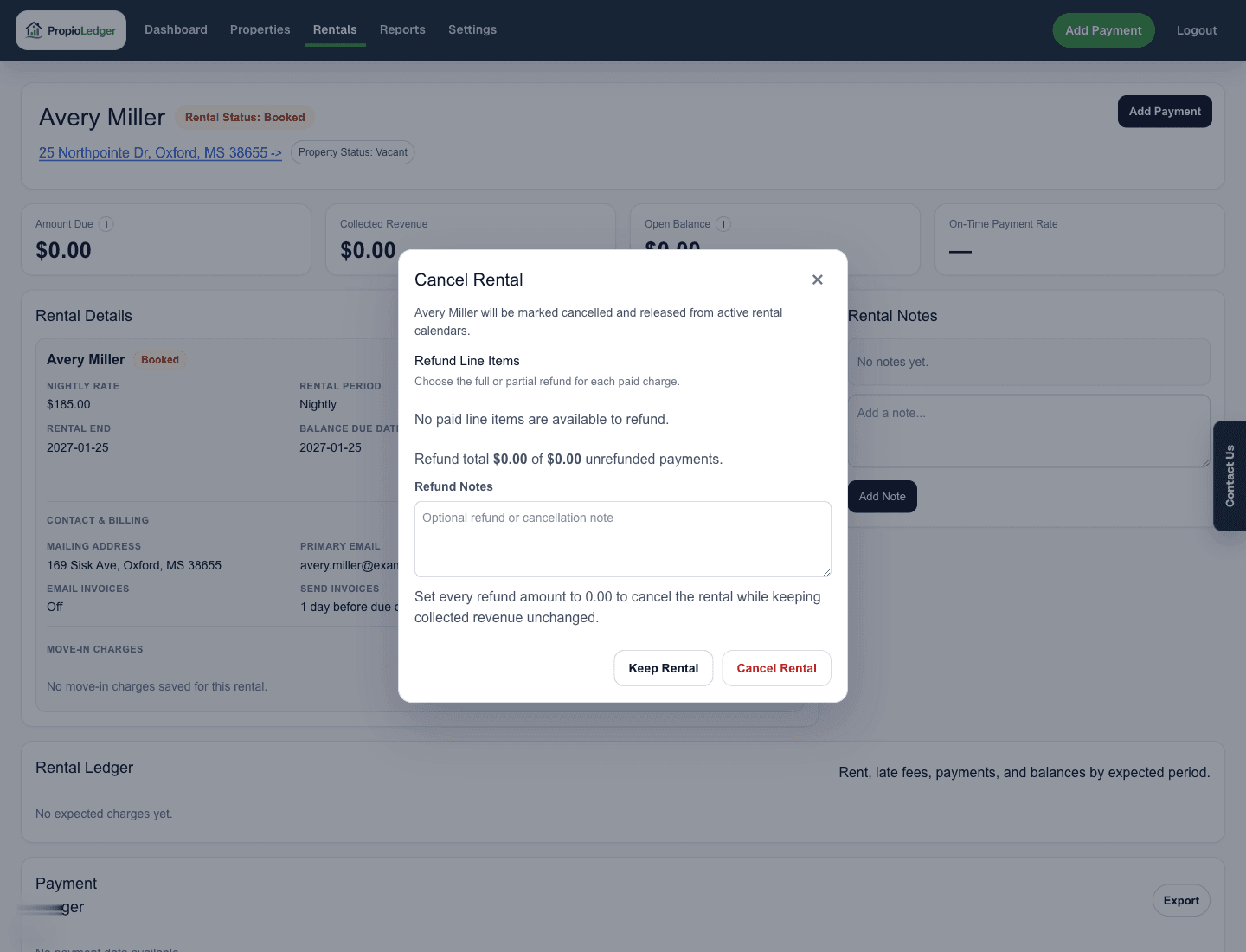
Canceling a future rental releases the booked date range from availability checks and can record full or partial refunds across existing unrefunded payments.
- Open the future booked rental.
- Choose Cancel Rental.
- Review the Refund Line Items section.
- Use Full to refund all available paid line items, None to keep collected revenue unchanged, or edit individual Refund amount fields.
- Add Refund Notes when helpful.
- Choose Cancel Rental.
What Cancellation Changes
- Rental status changes to Cancelled.
- Availability is restored.
- Future invoice emails stop.
- Occupancy calculations are updated.
- The booking no longer blocks future rentals.
- Canceled rentals are preserved for historical context but are excluded from normal active occupancy and balance action queues.
Refund Fields In Lifecycle Modals
End Rental can show Deposit Refunds for refundable deposit payments. Cancel Rental can show Refund Line Items for paid charges on the future booking.
Refund amounts update payment records by storing refunded amount, refunded date, and refund notes. The original payment remains in history, but its net collected amount is reduced.
Extend Rental
Use Extend Rental when a Booked or Active rental should continue beyond its current end date. This is common when a tenant renews, a month-to-month tenant remains in place, or a short-term guest extends their stay.
The new end date must be after the current end date and must pass future date conflict checks.
Extending updates the payment end date and can reopen an ended rental when extension behavior requires it. It does not record a refund.
What Extension Changes
- The rental end date is updated.
- Availability is recalculated.
- Occupancy is recalculated.
- Future rent charges may be generated.
- Future invoice schedules may be updated.
Conflict Checking
Before saving an extension, PropioLedger checks for rental conflicts. An extension cannot create overlapping rental dates for the same property.
For example, if a rental currently ends on June 30 and is extended to August 31, the rental remains active and occupancy continues through August 31 as long as no conflicting booking blocks those dates.
Delete Rental
Delete Rental is for data-entry mistakes only. It is hidden behind rental edit controls and is blocked while unrefunded payments remain.
If a real rental was booked, started, paid, or canceled, prefer lifecycle actions so availability, accounting, and audit history remain intact.
- Use Delete Rental for duplicate rentals entered accidentally, incorrect rentals created during testing, or clear data-entry mistakes.
- Do not delete rentals simply because the renter moved out, the booking was canceled, or the rental ended.
- Rentals with payment activity generally should not be deleted. Use End Rental or Cancel Rental whenever possible.
Lifecycle Action Summary
- Booked rentals: Extend Rental and Cancel Rental may be available.
- Active rentals: End Rental and Extend Rental may be available.
- Ended rentals: normal lifecycle actions are not available, though some extension workflows may effectively reopen a rental depending on the circumstances.
- Cancelled rentals: normal lifecycle actions are not available.
- Delete Rental: limited-use correction action for data-entry mistakes.
Effects On Occupancy And Availability
- End Rental: occupancy ends on the new rental end date, and future availability may increase if the rental ends earlier than planned.
- Extend Rental: occupancy continues through the extended period, and availability decreases because additional dates become reserved.
- Cancel Rental: future occupancy is removed, and reserved dates are released for future bookings.
- Delete Rental: occupancy and availability history associated with the rental may be removed.
Effects On Invoices And Reporting
- End Rental: future invoice emails stop, while historical reporting and financial data are preserved.
- Extend Rental: invoice schedules may extend, and future occupancy and rental projections update.
- Cancel Rental: future invoice emails stop, and future booking activity is removed from occupancy and availability calculations.
- Delete Rental: invoice and reporting history associated with the rental may be removed.
Activity Logging
Rental lifecycle actions are recorded in the activity log so important rental changes have an audit trail.
- Rental Ended
- Rental Extended
- Rental Cancelled
- Rental Updated
Refunds Versus Waived Charges
- Refund during End Rental or Cancel Rental when money was collected and is being returned.
- Waive from the Rental Ledger when money was not collected and the renter no longer owes an unpaid amount.
- Refunds reduce net collected payment amounts. Waivers reduce charge balances.
- Do not delete payments just because money was returned; use the lifecycle refund fields so the original payment remains auditable.
Common Questions
- Where is the Refund button?Refund is not a standalone Payment Ledger action. Refund fields appear while ending a started rental or canceling a future booked rental when refundable payments exist.
- Can I cancel an active rental?No. Once the rental has started, use End Rental.
- Does ending a rental remove the balance?No. Ending closes occupancy, but unpaid charges remain until paid or waived.
- What if I cancel a future rental but do not want to refund collected money?Set refund amounts to 0.00 in the Cancel Rental modal.
- Will canceling a rental free up the dates?Yes. Cancelled rentals no longer reserve dates and no longer block future bookings.
- Should I delete rentals?Generally no. Delete Rental should only be used to correct data-entry mistakes.
Related Guides
Last Updated
May 2026