
Reports
Rentals Ending Report
Plan renewals, turnovers, and occupancy follow-up by reviewing rentals ending inside a selected date range.
Overview
The Rentals Ending Report helps landlords identify rentals that are ending soon, ending today, or recently ended so they can plan renewals, turnovers, inspections, marketing, and occupancy follow-up.
Use this report when you want to avoid surprise vacancies and see which renters or properties need attention before a rental end date arrives.
When To Use It
Rental end dates are operational decision points. They often trigger renewal conversations, extension decisions, move-out planning, property inspections, cleaning, repairs, and marketing activities.
The report answers questions such as which rentals are ending soon, which rentals ended recently, which properties may become vacant, and how much rental rate value is represented by the selected ending window.
Available Date Ranges
- This Week.
- This Month.
- Next 7 Days.
- Next 30 Days.
- Next 60 Days.
- Next 90 Days.
- Last 30 Days.
- Custom Range.
Summary Metrics
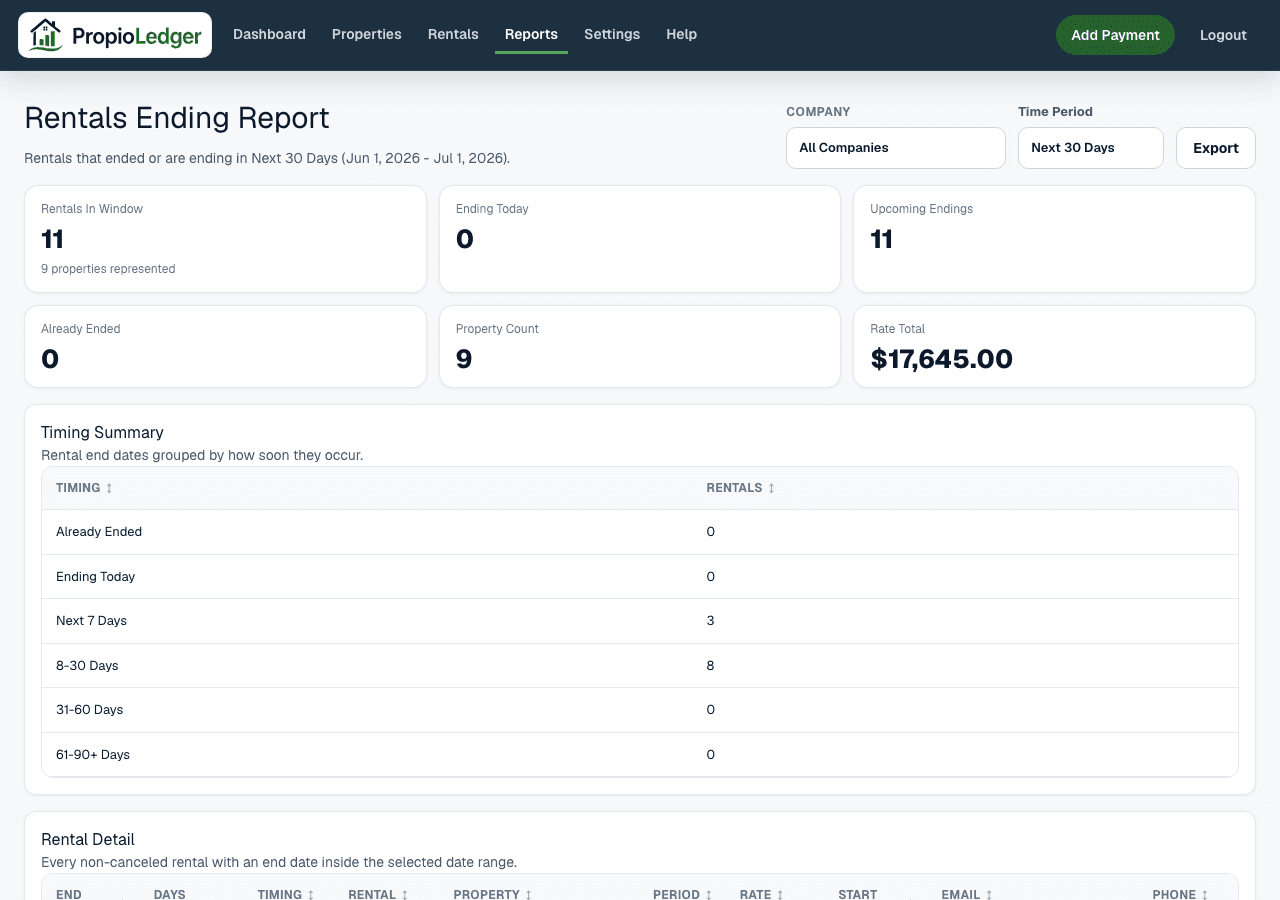
Rentals In Window is the count of non-canceled rentals whose rental end date falls inside the selected date range.
Ending Today is the count of rentals whose rental end date equals today.
Upcoming Endings is the count of rentals whose rental end date is after today.
Already Ended is the count of rentals whose rental end date is before today.
Property Count is the number of properties represented by the rentals in the selected window.
Rate Total is the sum of the Rate column for all rental rows in the selected date range.
Timing Summary
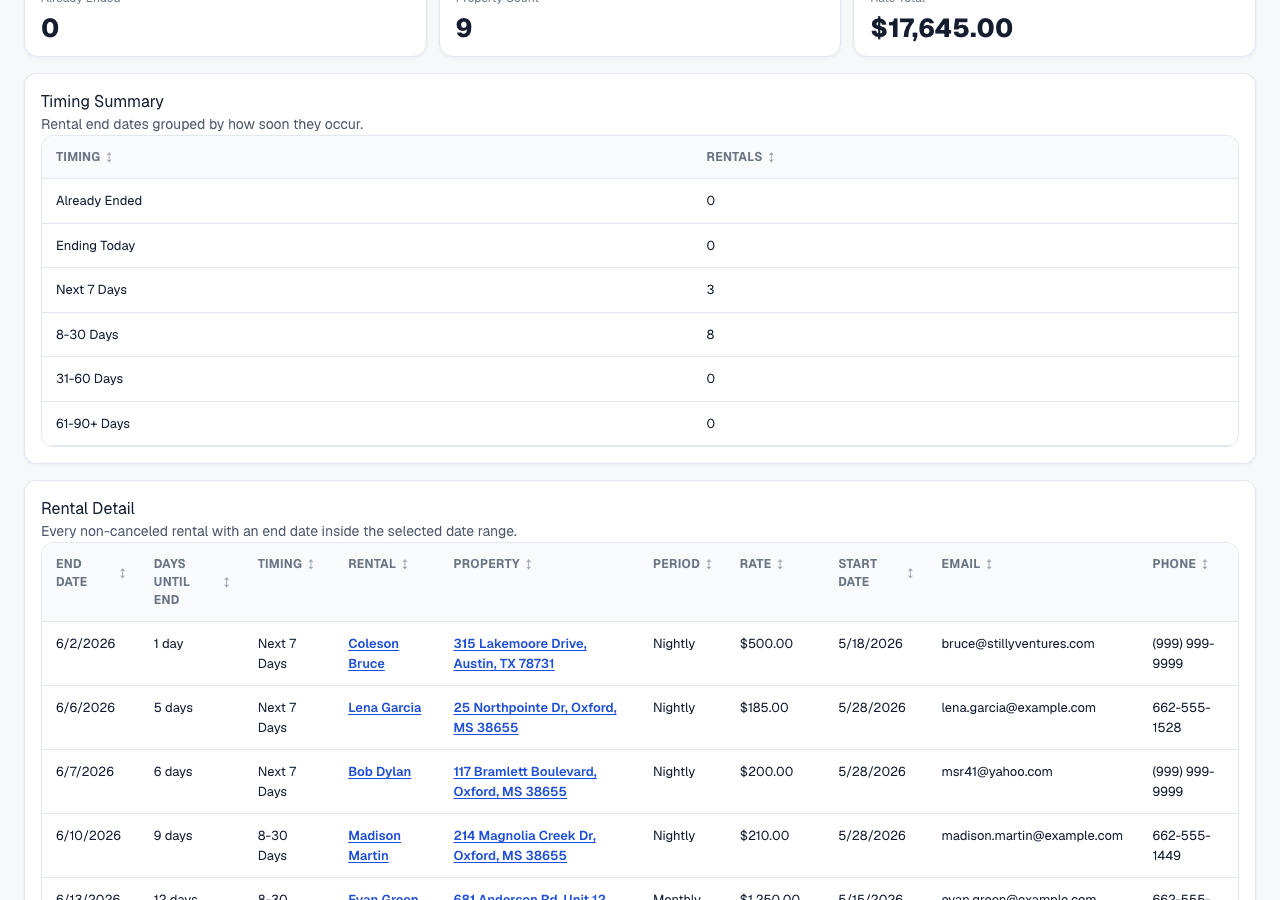
The Timing Summary groups rentals by how soon their end dates occur. Buckets include Already Ended, Ending Today, Next 7 Days, 8-30 Days, 31-60 Days, and 61-90+ Days.
Use this section to prioritize the most urgent renewal, turnover, and vacancy-prevention work first.
Rental Detail
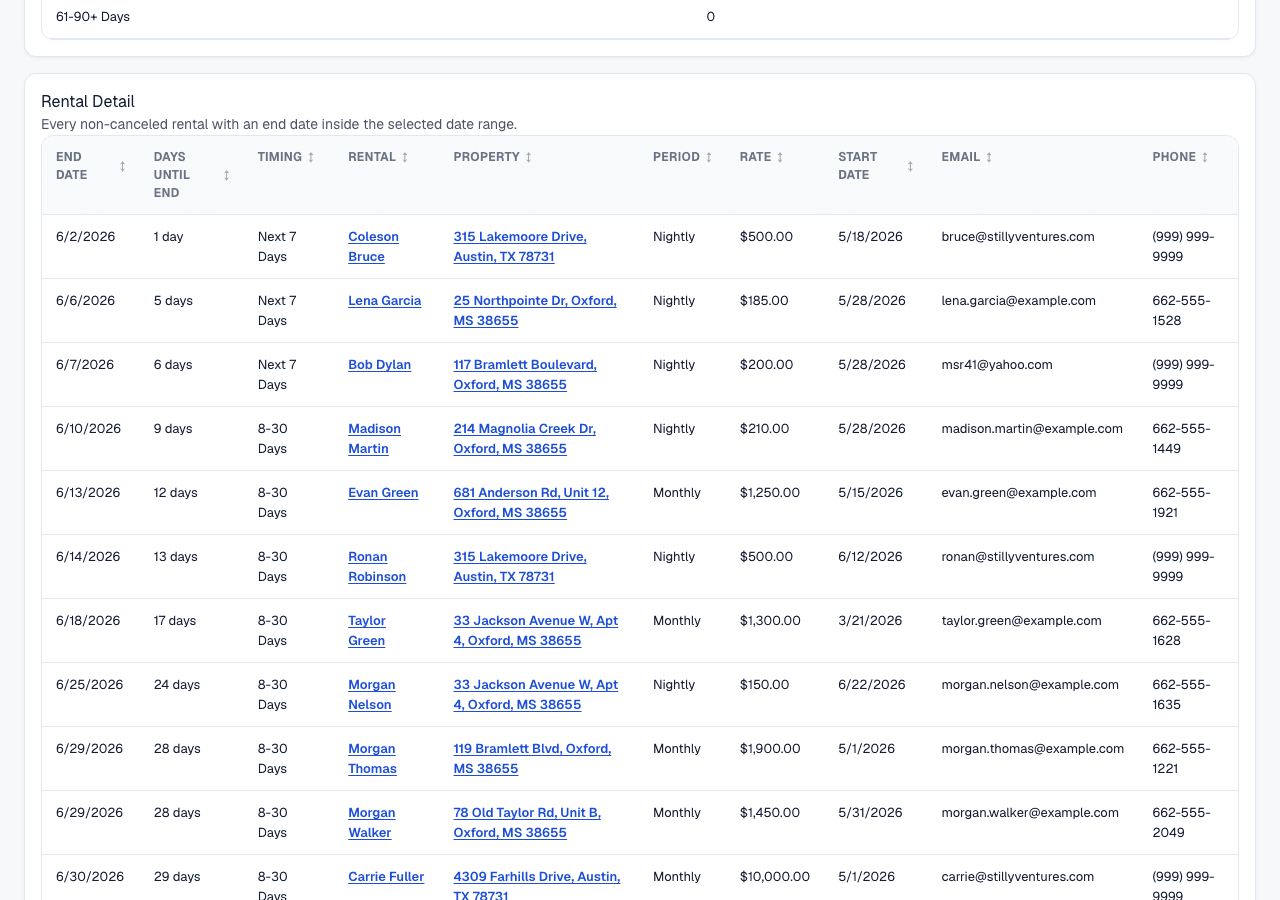
The Rental Detail section lists every non-canceled rental with an end date inside the selected range. Each row includes end date, days until end, timing, rental, property, period, rate, start date, email, and phone.
Use this table to contact renters, coordinate renewals, schedule turnover tasks, and trace a timing bucket back to the exact rental.
Understanding Report Columns
End Date is the rental end date. Date-only rental end dates are treated as active through the end date itself.
Days Until End is the calendar-day difference between today and the rental end date. Future dates show days remaining, today shows Today, and past dates show days ago.
Timing is the operational bucket for the rental end date, such as Ending Today, Next 7 Days, or Already Ended.
Rate uses the rental Period Rate, falling back to Expected Monthly Rent when Period Rate is not available.
Email and Phone come from the rental contact information and are included to support follow-up work.
Formula
Rentals In Window = count of non-canceled rentals whose rental end date falls inside the selected date range.
Date ranges are inclusive of both the start date and end date.
This Week uses the current calendar week from Sunday through Saturday.
Next 7, 30, 60, and 90 Days run from today through the selected number of days from today.
Days Until End = calendar-day difference between today and the rental end date.
Rate Total = sum of Rate for all rows in the selected date range.
Data Sources
The report uses rental records, rental end dates, rental start dates, rental period, rate values, renter contact information, and associated property addresses.
Rate uses the rental Period Rate when available and falls back to Expected Monthly Rent when Period Rate is not available.
Rows are limited to rentals and properties visible in the current company scope.
Included Records
- Non-canceled rentals with an end date inside the selected date range.
- Rentals ending today, because date-only end dates are active through the end date.
- Past rentals when the selected range includes dates before today, such as Last 30 Days.
- Renter contact email and phone when stored on the rental.
- Properties represented by included rental rows.
Excluded Records
- Canceled rentals.
- Rentals without an end date.
- Rentals whose end date falls outside the selected date range.
- Property expenses and payment transactions, because this is an operational rental-ending report rather than a financial activity report.
- Rentals outside the current company scope.
How End Dates Are Treated
A rental ending today appears as Ending Today, not Already Ended. This keeps the report practical for same-day renewal, move-out, or turnover follow-up.
Already Ended only applies when the rental end date is before today. Upcoming Endings only applies when the rental end date is after today.
Rentals Ending Vs Performance
The Rentals Ending Report focuses on upcoming and recent rental expirations for renewal and turnover planning.
The Performance Report focuses on rental revenue, missed rent, vacancy loss, collections, and occupancy performance. Use Rentals Ending to plan future occupancy work and Performance to review revenue and occupancy results.
Common Use Cases
- Start renewal conversations before a rental ends.
- Plan inspections, cleaning, repairs, and marketing for upcoming turnovers.
- Review recent endings that may still need operational follow-up.
- Identify properties that may become vacant soon.
- Use Rate Total to understand the rental rate value represented by the selected ending window.
Things To Watch For
- Rentals without end dates do not appear in the report.
- Canceled rentals are excluded.
- Rate Total is a planning total based on rental rates, not a revenue forecast or cash collection total.
- A rental ending today is still treated as Ending Today for operational follow-up.
- Missing contact information means the Email or Phone column will be blank.
Export Options
The Rentals Ending Report supports CSV download, Excel download, and printable PDF-style browser export.
Related Guides
Common Questions
- Why is the Rentals Ending Report important?It helps landlords prepare for renewals, turnovers, and potential vacancies before they become urgent.
- What is Days Until End?It is the number of calendar days between today and the rental end date.
- Are canceled rentals included?No. Canceled rentals are excluded.
- Can I see rentals that already ended?Yes. Use a date range that includes past end dates, such as Last 30 Days or a custom range.
- What is Rate Total?Rate Total is the combined Rate value of all rentals included in the selected reporting window.
Last Updated
June 2026