
Reports
Reports Overview
Understand which PropioLedger reports are available, what each report is best for, and a practical monthly review workflow.
Overview
PropioLedger reports help landlords turn rental, payment, expense, and ledger activity into practical portfolio insight.
Use the Reports area to monitor rental performance, review cashflow and profitability, manage balances and collection follow-up, analyze expenses, plan future income, and prepare for upcoming rental endings.
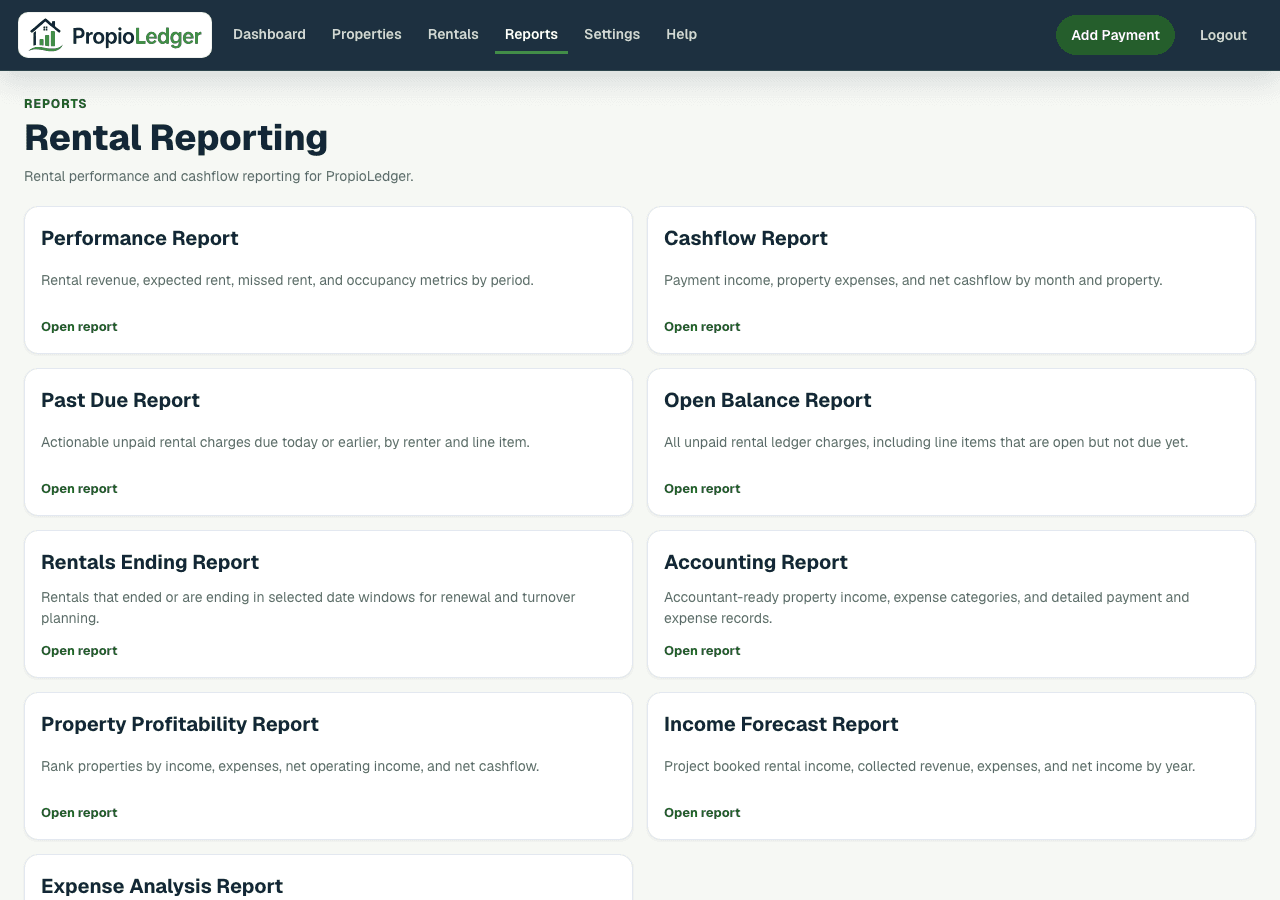
Report Categories
Performance reports focus on occupancy, rent collections, vacancy impact, and rental performance.
Financial reports focus on income, expenses, cashflow, profitability, accounting activity, and planning.
Balance reports focus on unpaid rental ledger charges, open balances, past due amounts, and collection follow-up.
Operational reports focus on rental activity that needs action, such as upcoming rental end dates.
Performance Report
The Performance Report combines rental revenue, expected rent, vacancy loss, missed rent, collection rate, occupancy rate, and rental count.
Use it for monthly portfolio reviews, collection monitoring, occupancy analysis, and property comparisons.
Cashflow Report
The Cashflow Report focuses on money entering and leaving the portfolio. It includes income, expenses, net cashflow, monthly totals, and property breakdowns.
Use it for financial reviews, budget planning, property comparisons, and cashflow analysis.
Property Profitability Report
The Property Profitability Report ranks properties by income, rental income, expenses, net operating income, and net cashflow.
Use it to compare properties, identify top performers and underperformers, and support portfolio decisions.
Income Forecast Report
The Income Forecast Report projects booked revenue, collected revenue, paid expenses, planned one-time expenses, scheduled expenses, projected expenses, and projected net income by calendar year.
Use it for forecasting, budgeting, annual planning, and future income analysis.
Accounting Report
The Accounting Report provides accountant-ready financial detail. It separates rental income from other collections, shows property expenses, and includes payment and expense detail.
Use it for accounting reviews, tax preparation support, financial categorization, and annual reporting. It supports accounting review but does not provide tax advice.
Expense Analysis Report
The Expense Analysis Report helps landlords understand where money is being spent by category, property, month, and detail row.
Use it for expense monitoring, budget reviews, cost management, and identifying spending patterns.
Open Balance Report
The Open Balance Report shows all committed unpaid rental ledger charges for active and future non-canceled rentals, including balances that are not yet due.
Use it for receivables management, balance reviews, future revenue visibility, and rental account monitoring.
Past Due Report
The Past Due Report focuses on unpaid rental ledger charges due today or earlier.
Use it for collections, delinquency management, renter follow-up, and aging analysis.
Rentals Ending Report
The Rentals Ending Report identifies rentals ending inside a selected window and groups them by timing.
Use it for renewal planning, vacancy prevention, turnover management, inspections, and occupancy planning.
Recommended Monthly Workflow
- Review the Performance Report for occupancy, collections, vacancy loss, and missed rent.
- Review the Open Balance Report for all outstanding receivables and future balances.
- Review the Past Due Report to identify immediate collection priorities.
- Review the Cashflow Report for income, expenses, and net cashflow.
- Review the Property Profitability Report to compare property performance.
- Review the Expense Analysis Report for spending trends and category cleanup.
- Review the Income Forecast Report for future income and expense planning.
- Review the Rentals Ending Report for renewal and turnover planning.
Exporting Reports
All authenticated reports support CSV download, Excel download, and printable PDF-style browser export.
Exports reflect the report period, filters, and company scope currently being viewed.
Common Questions
- Which report should I start with?Most landlords start with Performance, Open Balance, Past Due, and Cashflow for a monthly review.
- Which report should I share with an accountant?The Accounting Report is the most accountant-ready view, often paired with Expense Analysis and Cashflow.
- Which report shows who owes money?Use Open Balance for all unpaid charges and Past Due for charges due today or earlier.
- Which report compares properties?Use Property Profitability for property ranking and Cashflow for money-in, money-out comparisons.
- Can reports be exported?Yes. Reports support CSV, Excel, and printable PDF-style browser exports.
Last Updated
June 2026