
Reports
Exporting Reports
Choose CSV, Excel, or printable PDF-style exports for report analysis, sharing, printing, and record keeping.
Overview
PropioLedger reports can be exported for additional analysis, sharing, record keeping, and printing.
Every authenticated report supports CSV download, Excel download, and printable PDF-style browser export. Choose the format based on what you plan to do with the data after exporting.
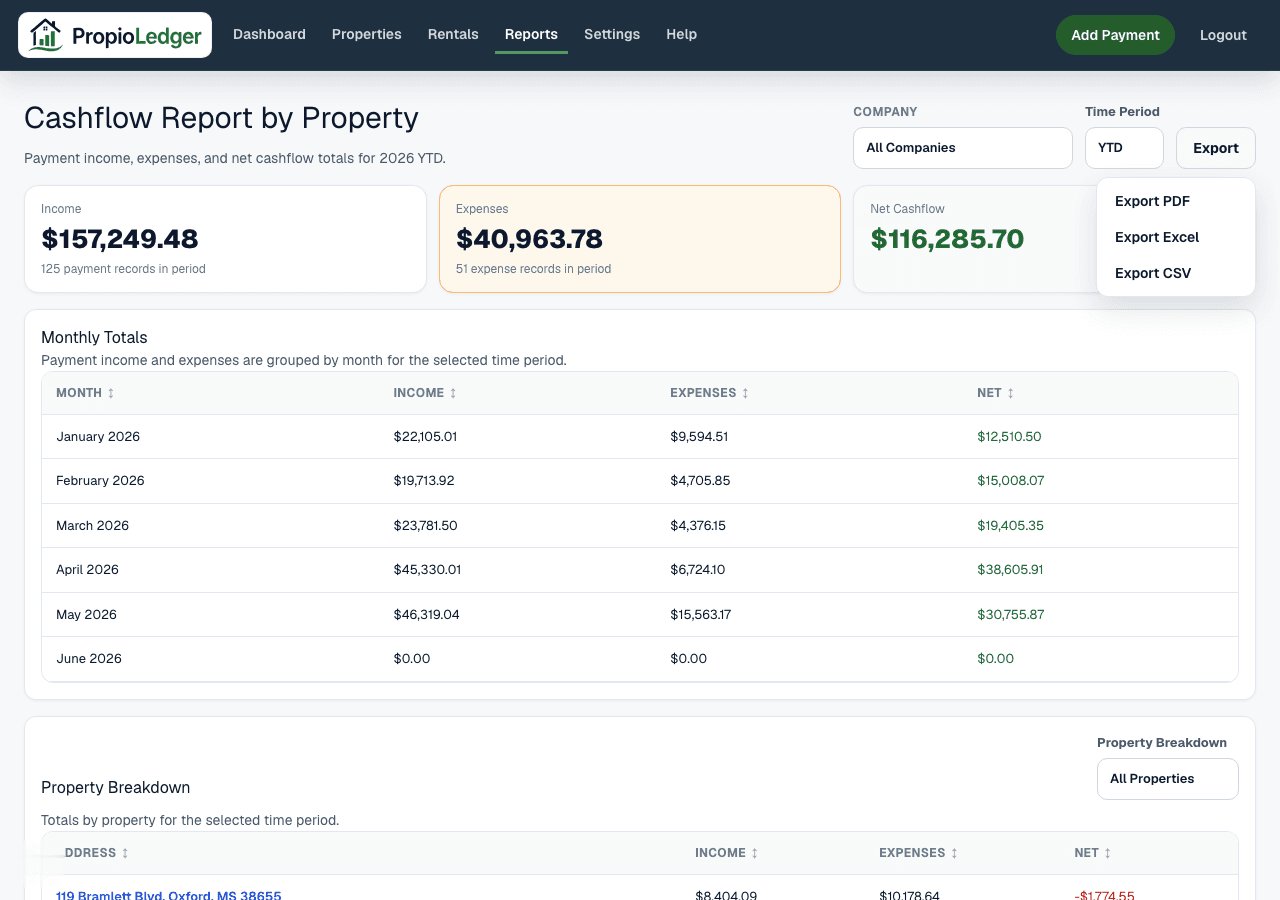
Available Export Formats
CSV Export provides raw report rows in a comma-separated format that can be opened by spreadsheet, database, and reporting tools.
Excel Export provides spreadsheet-ready report data for additional analysis, sorting, filtering, and sharing.
Printable PDF-style Export opens a printer-friendly browser view that can be printed or saved from the browser print dialog.
When To Use CSV
Use CSV when you need raw data, custom analysis, spreadsheet imports, database imports, or data manipulation.
CSV is lightweight, widely supported, and useful when combining report data with other tools.
When To Use Excel
Use Excel when you want a familiar spreadsheet format for financial reviews, budget planning, property analysis, or accountant collaboration.
Excel exports are useful for sorting, filtering, formulas, and sharing report data with people who prefer spreadsheet files.
When To Use Printable Export
Use printable export when you need a printer-friendly version for offline review, meetings, accounting conversations, investor or partner review, or physical records.
The printable export is best for presentation and review. Use CSV or Excel when you need to manipulate the data.
How To Export A Report
- Open the report you want to export.
- Select the reporting period and any available filters.
- Review the on-screen data to confirm the date range, company scope, and report contents.
- Open the Export menu.
- Choose PDF, Excel, or CSV.
- Save, print, or share the exported file using your browser or spreadsheet application.
What Gets Exported
Exports reflect the report data currently being viewed. That means the selected period, filters, and company scope matter.
Depending on the report, exports may include summary metrics, monthly breakdowns, property-level details, category summaries, line-item balances, payment detail, expense detail, or rental detail.
Large Report Tips
- Verify filters and date ranges before exporting.
- Use CSV or Excel for large detail-heavy reports.
- Use printable export for presentation and review rather than heavy data manipulation.
- For accountant review, export the report after confirming payment and expense classifications.
Common Export Workflows
For accounting review, landlords often export Accounting, Expense Analysis, and Cashflow reports.
For monthly portfolio review, landlords often export Performance, Property Profitability, and Cashflow reports.
For collection review, landlords often export Open Balance and Past Due reports.
For forecasting and planning, landlords often export the Income Forecast and Rentals Ending reports.
Data And Privacy
Exports can include renter names, contact information, payment detail, balances, and property financial information depending on the report.
Only share exported files with people who should have access to that information, such as your accountant or authorized business partners.
Related Guides
Common Questions
- Which reports can be exported?All authenticated report pages support export options.
- What export formats are available?Reports support CSV, Excel, and printable PDF-style browser export.
- Do exports respect report filters?Yes. Exports reflect the report data currently being viewed.
- Which format should I use for custom analysis?Use CSV or Excel when you need to manipulate, combine, or analyze the data.
- Can exported reports be shared with accountants?Yes. Many landlords export reports for accounting review, but exported files may contain sensitive data and should be shared carefully.
Last Updated
June 2026