
Reports
Performance Report
Understand potential revenue, expected rent, vacancy loss, collected revenue, missed rent, collection rate, occupancy rate, and rental count.
Overview
The Performance Report helps landlords understand rental collections, missed rent, vacancy loss, occupancy, and overall portfolio performance for a selected period.
Use this report when you want to see how revenue performance is affected by both vacancies and unpaid rent. It combines monthly trends, property-level comparison, and rental-level detail in one report.
When To Use It
The Performance Report is useful for monthly portfolio reviews, identifying collection issues, monitoring occupancy trends, and comparing property performance.
It answers questions such as how much rent should have been collected, how much rental revenue was collected, how much revenue was lost to vacancy, and which properties or rentals need follow-up.
Available Date Ranges
- Last Year.
- Year To Date.
- Specific month.
Summary Metrics
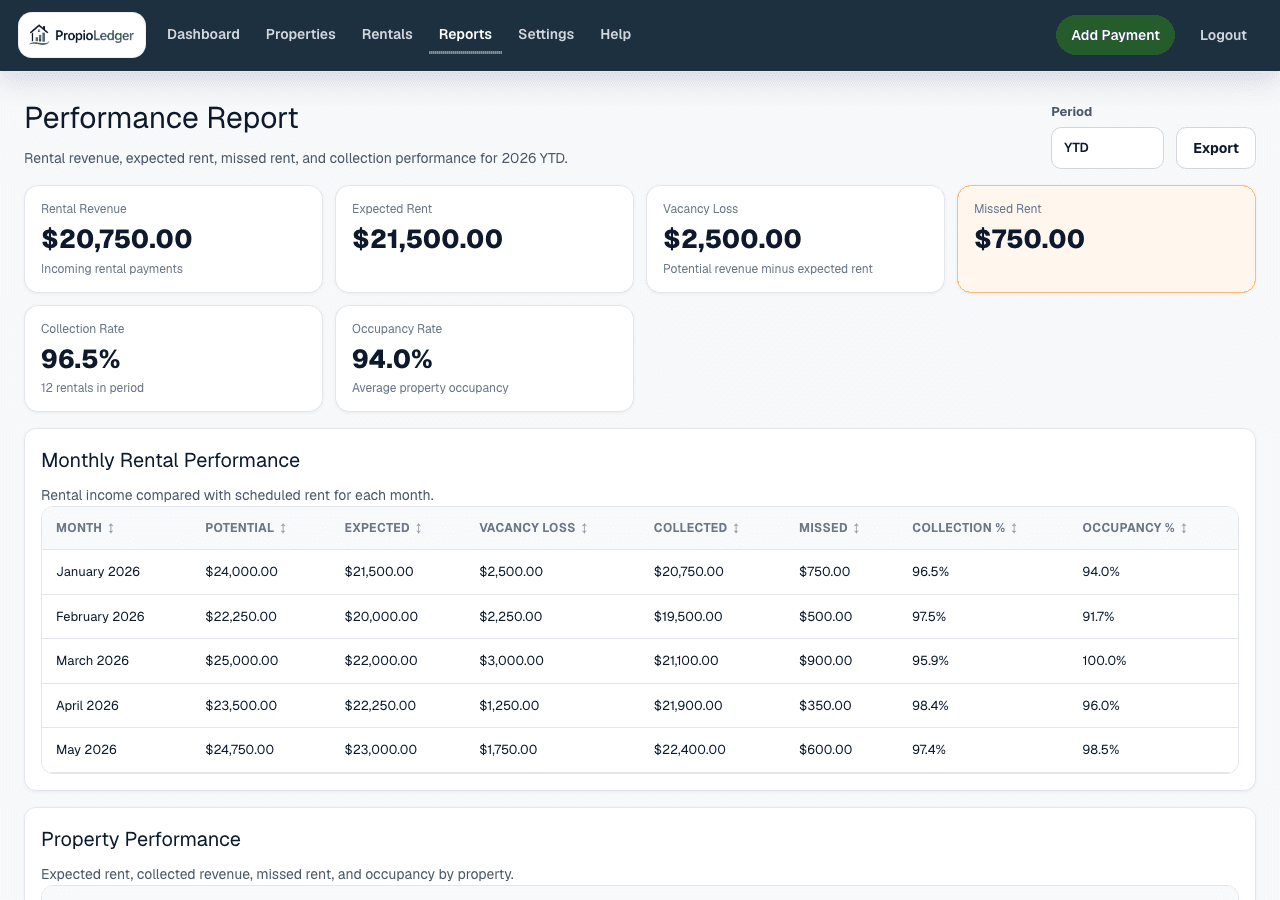
Potential Revenue estimates the maximum monthly revenue the selected properties could have generated during the period. For each property-month, PropioLedger uses the greater of that property-month expected rent and the property default monthly rate. If no default monthly rate exists, it falls back to expected rent for that month.
Expected Rent is the sum of rental ledger expected amounts for ledger months inside the selected period.
Vacancy Loss is Potential Revenue minus Expected Rent, never below zero. It estimates revenue lost to vacancy and does not include missed payments on occupied rentals.
Collected Revenue is the sum of net payment amounts whose payment date or month falls inside the selected period and whose payment type counts as rental revenue. Refunds reduce collected totals.
Missed Rent is due unpaid ledger charge remaining amount. Prior months are evaluated as of that month end; the current month is evaluated as of today.
Collection Rate is Collected Revenue divided by Expected Rent. Occupancy Rate summarizes the share of properties occupied during the report period. Rental Count is the number of rentals included in the report data.
Monthly Performance
The Monthly Rental Performance section shows one row per month in the selected period. It is designed to reveal changes in potential revenue, expected rent, vacancy loss, collected revenue, missed rent, collection percentage, and occupancy percentage over time.
Use this section to spot seasonal patterns, vacancy shifts, and months where collections fell behind expected rent.
Property Performance
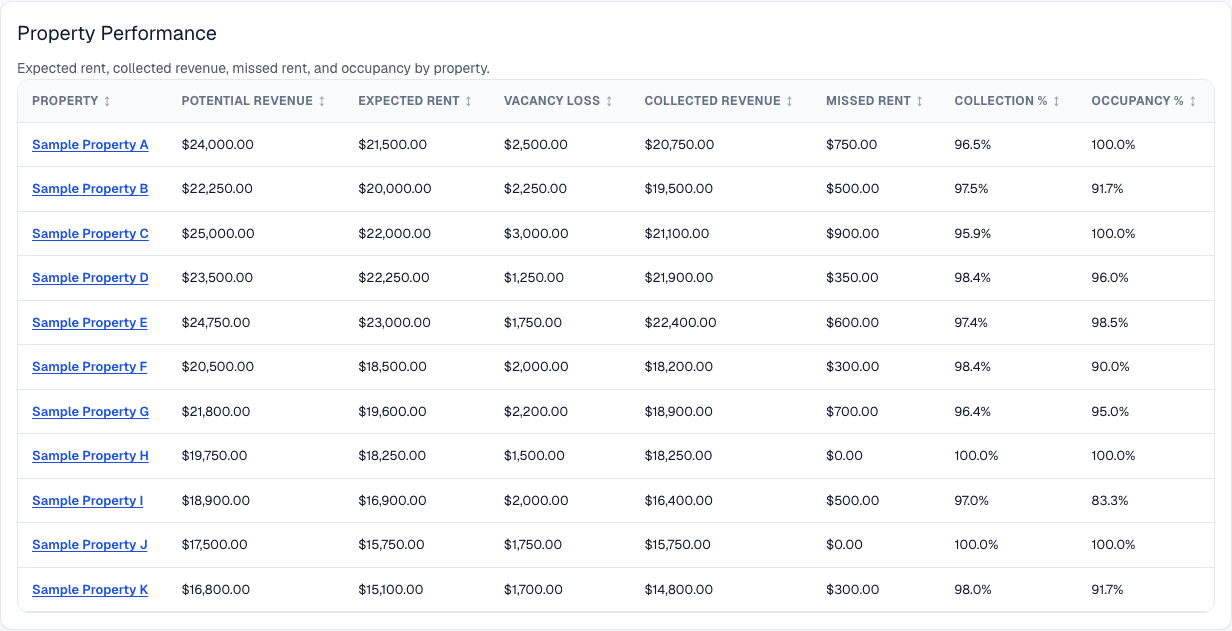
The Property Performance section compares individual properties. It shows potential revenue, expected rent, vacancy loss, collected revenue, missed rent, collection percentage, and occupancy percentage for each property.
This section helps identify top-performing properties, properties with collection issues, and properties experiencing excessive vacancy.
Rental Breakdown
The Rental Breakdown section shows performance for individual rental agreements. It includes the renter, property address, expected rent, collected revenue, missed rent, and collection percentage.
Use this section when investigating specific collection issues or tracing a property-level missed rent total back to the rental causing it.
Formula
Potential Revenue = sum of each property-month revenue potential in the selected period.
Property-month Potential Revenue = greater of that month expected rent for the property and the property default monthly rate. If no default monthly rate exists, expected rent is used.
Vacancy Loss = Potential Revenue - Expected Rent, never below zero.
Net payment amount = payment amount - refunded amount, never below zero.
Collection Rate = Collected Revenue / Expected Rent * 100. It is blank when Expected Rent is zero.
Data Sources
Expected Rent, Missed Rent, and rental-level balances come from the rental ledger. The rental ledger is the source of truth for rental charges, payments, waivers, refunds, open balances, and past due amounts.
Collected Revenue comes from payment records after refunds and only includes payment types that count as rental revenue. Occupancy uses non-canceled rentals that overlap each month.
Potential Revenue uses property default monthly rates and ledger expected rent to estimate monthly revenue potential.
Included Records
- Rental ledger expected amounts for ledger months inside the selected period.
- Net rental-revenue payments dated inside the selected period.
- Unpaid ledger charge remaining amounts due as of the report evaluation date.
- Non-canceled rentals that overlap each month for occupancy calculations.
- Properties visible to the current company scope.
Excluded Records
- Canceled rentals for occupancy and active performance comparisons.
- Security deposits, pet deposits, reimbursements, and other non-revenue collections from Collected Revenue.
- Future unpaid charges that are not due yet from Missed Rent.
- Vacancy Loss from Missed Rent. Vacancy Loss measures unbooked potential revenue, while Missed Rent measures unpaid due charges.
Common Use Cases
- Review Missed Rent and Collection Rate to identify rentals requiring follow-up.
- Review Vacancy Loss and Occupancy Rate to understand the revenue impact of vacancies.
- Use Property Performance to compare revenue performance across the portfolio.
- Use Monthly Performance to identify changes in occupancy or collection trends.
Things To Watch For
- Potential Revenue depends on property default monthly rates. Missing default rates may cause potential revenue to fall back to expected rent.
- Collected Revenue is based on payment dates and rental-revenue payment types, so timing and payment classification matter.
- A property can have vacancy loss even when collections are strong, and it can have missed rent even when occupancy is high.
- Security deposits and reimbursements may affect cashflow or balances, but they are not rental revenue in this report.
Export Options
The Performance Report supports CSV download, Excel download, and printable PDF-style browser export.
Related Guides
Common Questions
- Why can Vacancy Loss and Missed Rent both appear?Vacancy Loss estimates revenue lost because a property was not booked or occupied. Missed Rent shows due ledger charges that remain unpaid.
- Why is Collection Rate blank?Collection Rate is blank when Expected Rent is zero because there is no expected amount to divide by.
- Do deposits count as Collected Revenue?Security deposits, pet deposits, reimbursements, and other non-revenue collections are excluded from Collected Revenue in the Performance Report.
- Why does Potential Revenue depend on default monthly rate?The default monthly rate gives PropioLedger a property-level revenue benchmark for months where the property may be vacant or underbooked.
Last Updated
May 2026