
Reports
Expense Analysis Report
Analyze paid property expenses and optional planned expenses by category, property, month, and detail row.
Overview
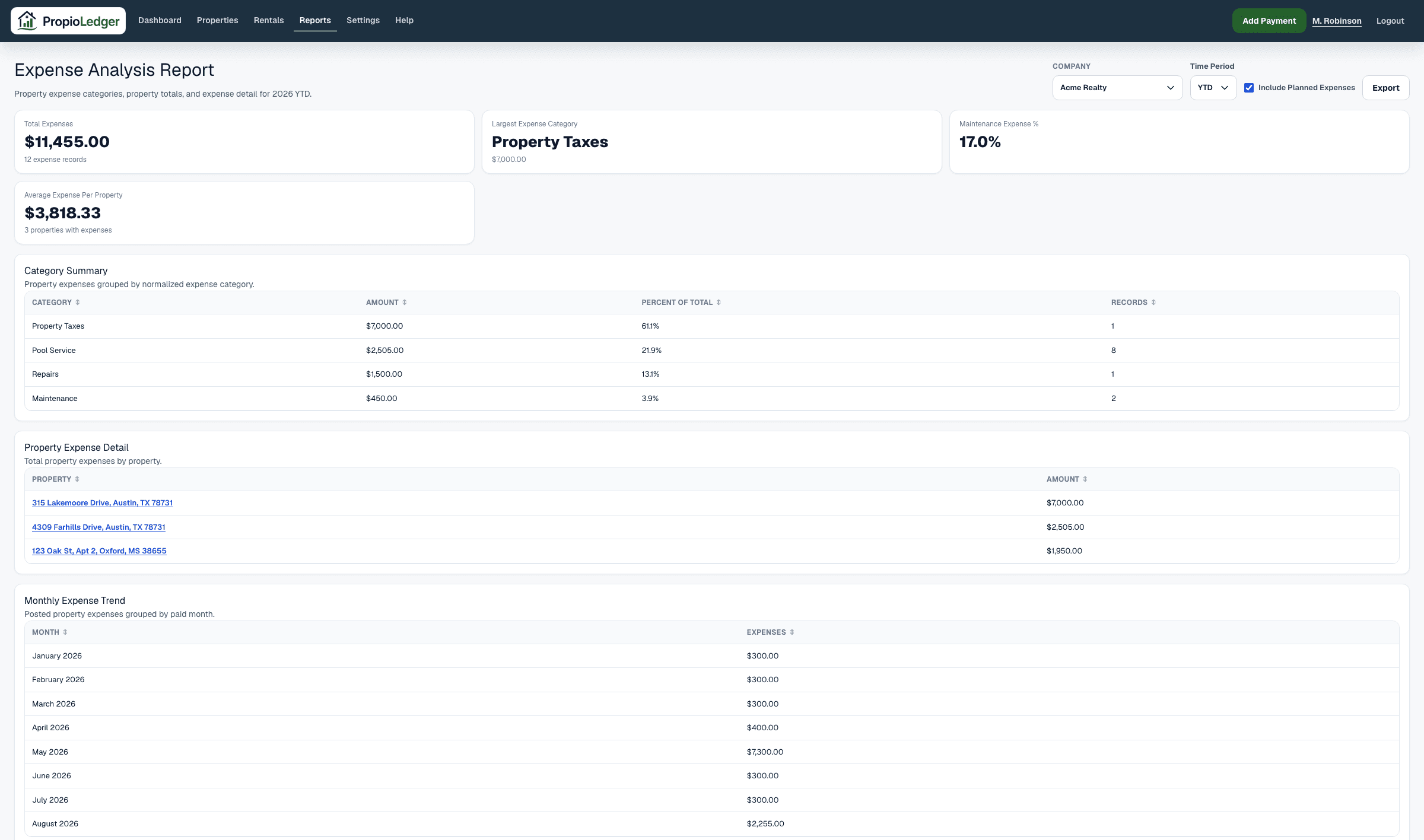
The Expense Analysis Report helps landlords understand where money is being spent across a rental portfolio. It organizes paid property expenses and optional planned expenses by category, property, month, and individual detail row.
Use this report when you want to identify the largest expense categories, compare operating costs across properties, review maintenance and repair spending, or research specific expense records.
When To Use It
Income is only one side of rental property performance. The Expense Analysis Report focuses on spending so landlords can monitor costs, identify trends, support budgeting, and improve profitability.
It answers questions such as what the largest expenses are, which properties cost the most to operate, whether maintenance and repairs are increasing, and which individual expense rows support the totals.
Available Date Ranges
- Year To Date.
- Prior calendar years that have expense data.
Summary Metrics
Total Expenses is the sum of paid property expense amounts whose date falls inside the selected period, plus planned expenses when Include Planned Expenses is turned on.
Largest Expense Category is the category row with the highest category total during the selected period.
Maintenance Expense Percent is Maintenance plus Repairs divided by Total Expenses, expressed as a percentage. It is zero when Total Expenses is zero.
Average Expense Per Property is Total Expenses divided by the number of property rows. It is zero when there are no property rows.
Expense Count is the number of included property expense records in the report. Property Count is the number of properties represented by those expense records.
Planned Expenses
Use Include Planned Expenses when you want planned repairs or other expected costs to appear in expense analysis totals.
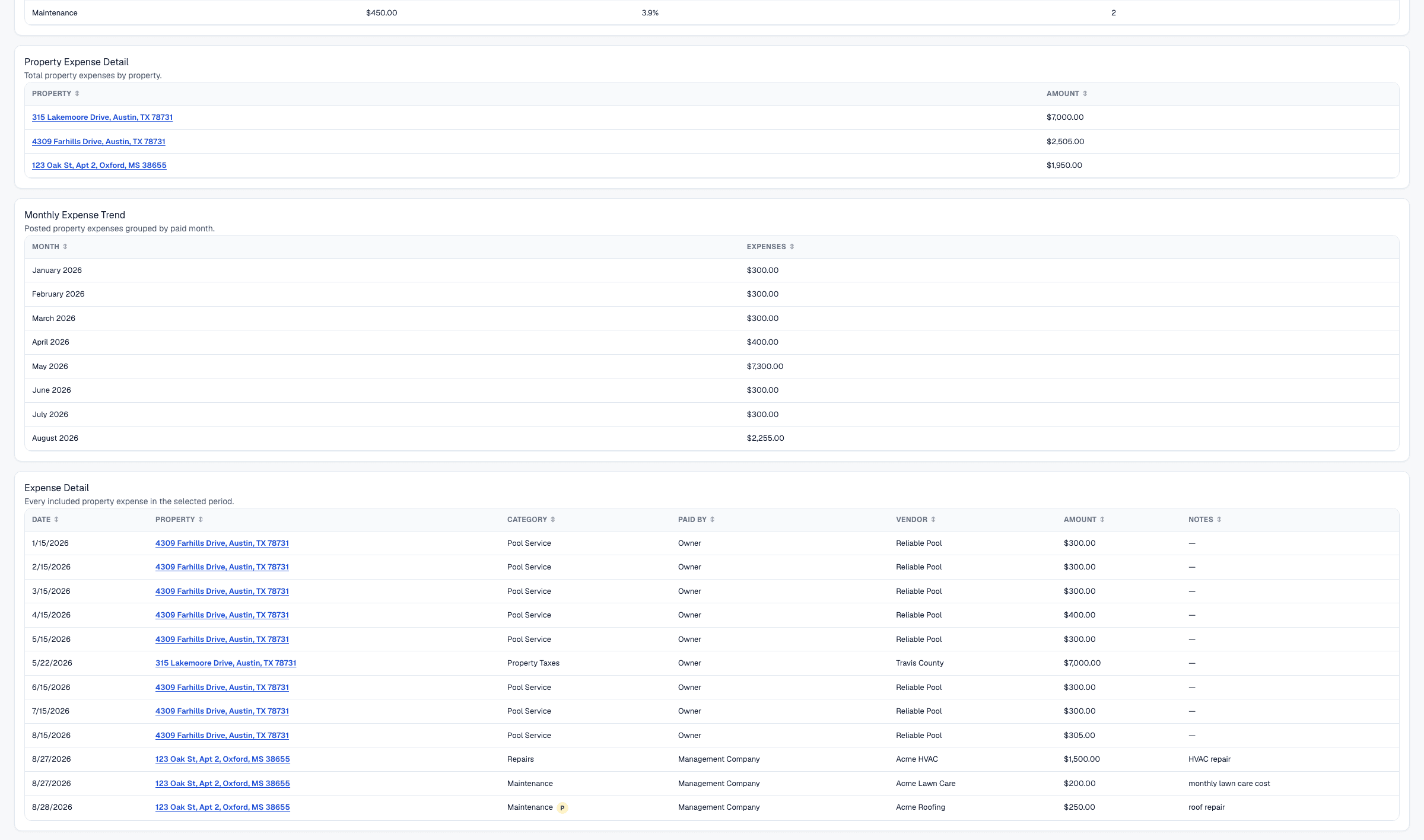
A P marker appears in supported tables when planned expenses exist for a month, category, or property. The marker helps you notice expected costs even when the report totals are currently paid-only.
Canceled expenses are excluded from Expense Analysis totals.
Category Summary
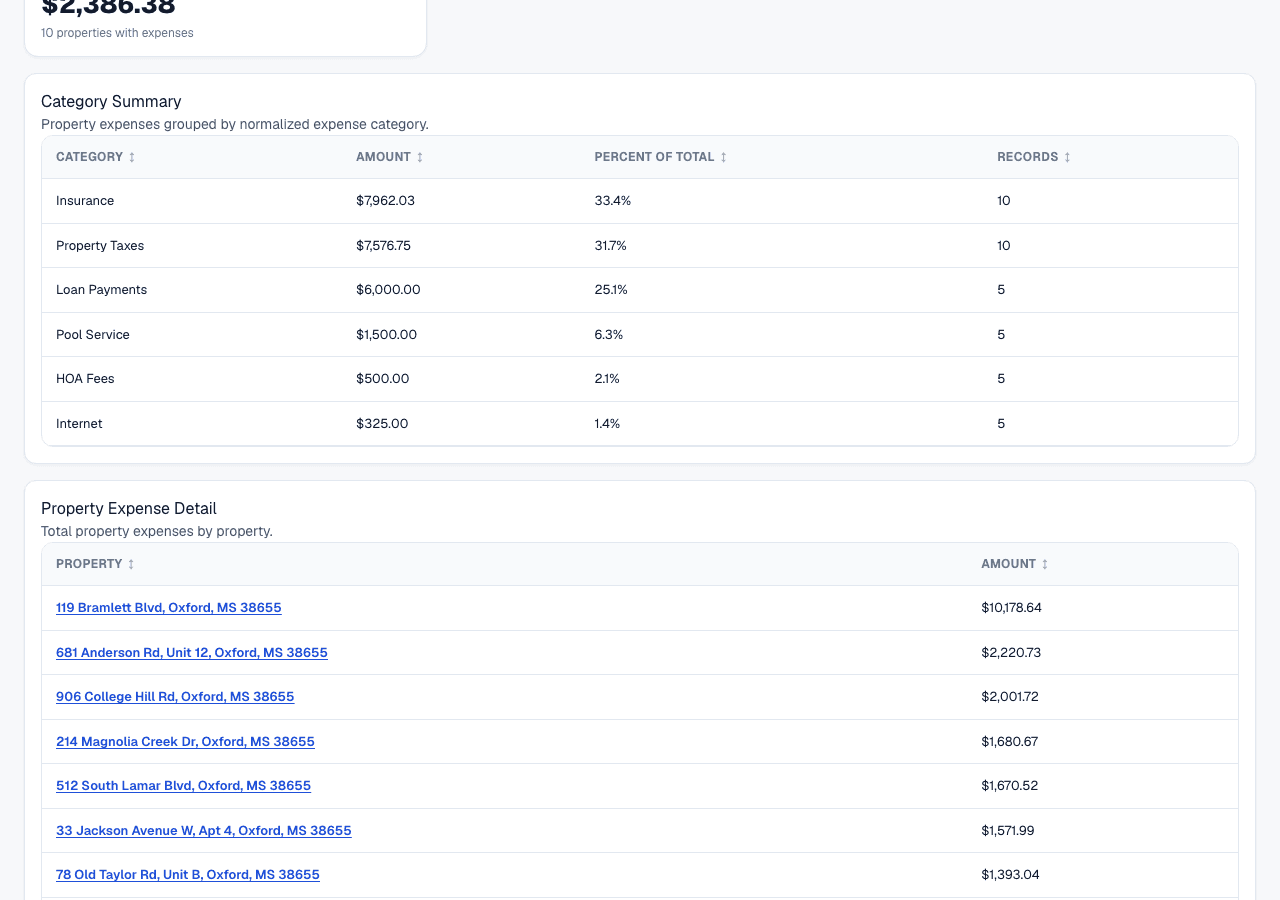
The Category Summary section groups included property expenses by normalized expense category. Each row shows category, amount, percent of total, and record count.
Use this section to identify the largest spending categories and understand which categories have the greatest impact on profitability.
Property Expense Detail
The Property Expense Detail section summarizes total expenses by property for the selected period.
Use it to compare operating costs across properties and identify properties with unusually high expenses.
Monthly Expense Trend
The Monthly Expense Trend section groups included expenses by expense month.
Use it to spot seasonal expense patterns, large one-time costs, unexpected increases, and longer-term spending trends.
Expense Detail
The Expense Detail section lists every included property expense in the selected period. Each row includes date, property, category, paid by, vendor, amount, and notes.
Use this section when researching a specific cost, checking a vendor, or reviewing source records before accountant review.
Formula
Total Expenses = sum of included property expense amounts whose date falls inside the selected period.
Category Total = sum of expenses in that category.
Category Percent Of Total = category total / total expenses * 100, or zero when Total Expenses is zero.
Largest Expense Category = category row with the highest Category Total.
Property Total = sum of expenses for that property.
Monthly Expenses = sum of expenses paid in that month.
Maintenance Expense Percent = (Maintenance + Repairs) / Total Expenses * 100, or zero when Total Expenses is zero.
Average Expense Per Property = Total Expenses / property count, or zero when there are no property rows.
Data Sources
The Expense Analysis Report uses paid property expense rows, plus planned rows when planned expenses are included. Expense dates are based on the expense date, not the date the record was created.
Expense categories are normalized property expense types. The report does not use renter ledger charges or payment transactions.
Scheduled recurring expense occurrences are not included until they become property expense records.
Included Records
- Paid property expenses whose date falls inside the selected period.
- Planned property expenses whose date falls inside the selected period when Include Planned Expenses is turned on.
- Expense category, property, vendor, paid-by, amount, and notes from included property expense records.
- Properties represented by included expense activity in the selected period.
- Expenses visible in the current company scope.
Excluded Records
- Planned expenses when Include Planned Expenses is turned off.
- Canceled expenses.
- Future scheduled recurring expense occurrences that have not become property expense rows.
- Rental ledger charges, because those are renter balance records rather than property expenses.
- Payment transactions, because the report focuses only on spending.
- Property expenses whose date falls outside the selected period.
- Expenses outside the current company scope.
Expense Analysis Vs Cashflow
The Expense Analysis Report focuses on spending, categories, trends, and cost drivers.
The Cashflow Report focuses on money in, money out, and net cashflow by month and property. Use Cashflow when you need income and expenses together, and use Expense Analysis when you want a deeper view of costs.
Expense Analysis Vs Accounting
The Expense Analysis Report is optimized for understanding spending patterns and cost drivers.
The Accounting Report is optimized for accountant-ready financial organization, including rental income, other collections, refunds, property expenses, and net operating income.
Common Use Cases
- Identify the largest expense categories in the selected period.
- Compare property operating costs across the portfolio.
- Monitor maintenance and repair spending over time.
- Review monthly expense trends for budgeting.
- Research specific expenses by date, property, vendor, and notes.
Things To Watch For
- Paid expenses are included by default. Planned expenses are included only when Include Planned Expenses is turned on.
- Expense date controls whether an expense appears in the selected period.
- Consistent expense categorization improves category totals and maintenance percentage accuracy.
- Maintenance Expense Percent only uses categories named Maintenance and Repairs.
- Expense Analysis does not include income, collections, or renter balances.
Export Options
The Expense Analysis Report supports CSV download, Excel download, and printable PDF-style browser export.
Related Guides
Common Questions
- What expenses are included?Paid property expenses whose date falls inside the selected period, plus planned expenses when Include Planned Expenses is turned on.
- Why is maintenance tracked separately?Maintenance and repairs are often variable cost drivers, so the report highlights their share of total expenses.
- What is Maintenance Expense Percent?It is Maintenance plus Repairs divided by Total Expenses.
- Why review expense trends?Trends help identify seasonal patterns, unexpected increases, and costs that may affect cashflow or profitability.
- How often should landlords review expenses?Many landlords review expenses monthly so category and vendor issues are easier to catch.
Last Updated
August 2026